
960p + Samsung TV
- This topic has 1 reply, 2 voices, and was last updated July 21, 2023 at 9:34 AM by
.
Viewing 2 posts - 1 through 2 (of 2 total)


Viewing 2 posts - 1 through 2 (of 2 total)
- You must be logged in to reply to this topic.
NewHome › Forums › OSSC, OSSC Pro and DExx-vd isl › OSSC – Discussion and support › 960p + Samsung TV
 BuckoA51.
I have a problem with 960p on my Samsung TVs
Picture is more dim then 240/480/720p
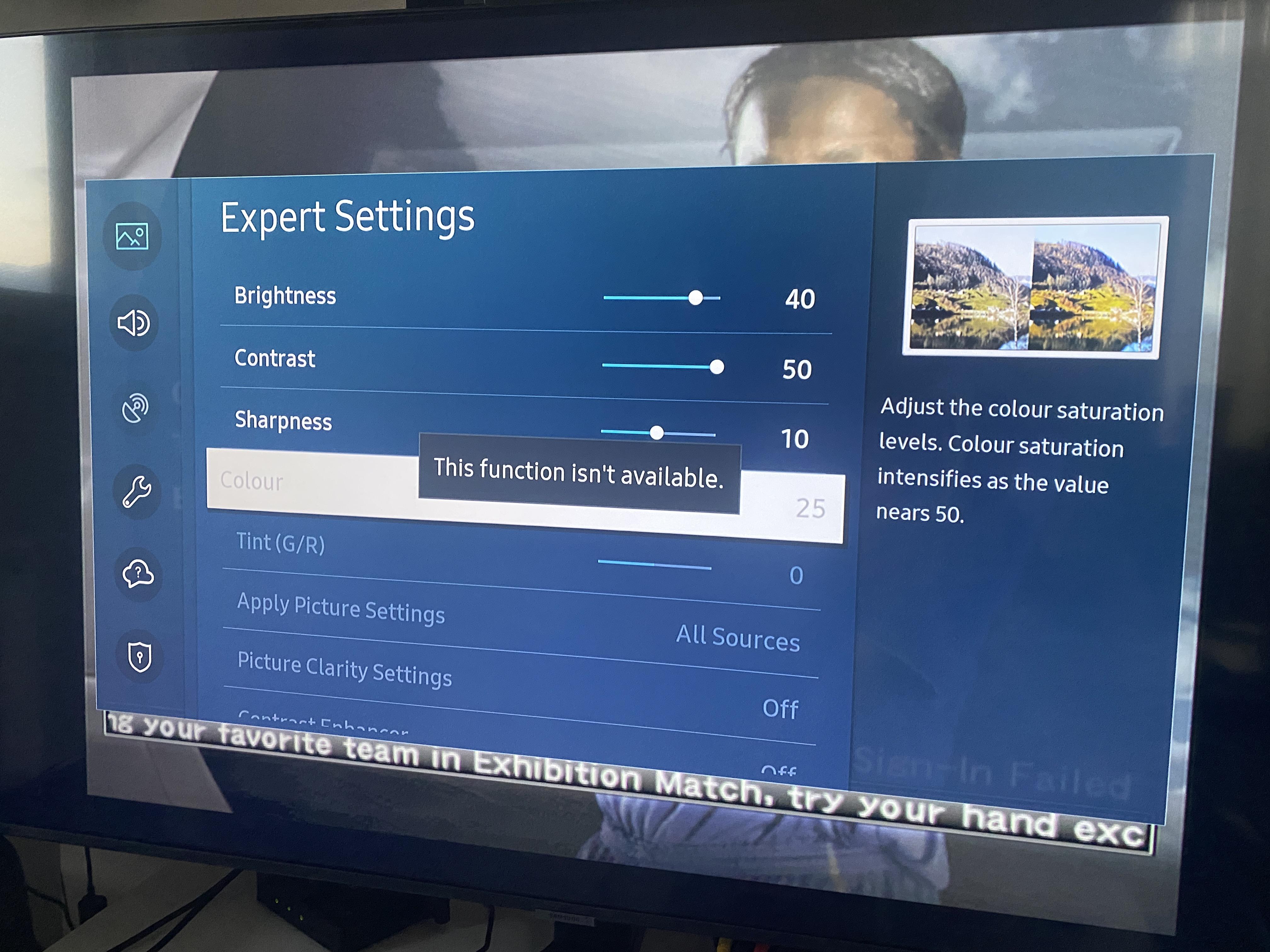
I check the settings and i see that “Colour” is 25 (and is not enough, because good picture start from 40)
But i can’t change this setting because it is hidden
I can change “Colour” when i use 240/480/720/1080
If i understand right, my TV understands 960p as PC Mode and doesn’t allow changing many settings
i see this on both Samsung TVs
My question is – how i can change this?
I check the service menu, but not find what i can change
Only launching HDMI calibration – the screen began to show normal colors at 960p, but this parameter doesn’t save
How i can turn off PC Mode? Or maybe change some settings in OSSC?
Because 960p – very good picture, but color is not enough(
 alreadyghost.
Most likely you cannot unfortunately. Usually colour is correct at its default setting on RGB/PC modes and adding extra just oversaturates it but you would need calibration tools to know for sure.
| Cookie | Duration | Description |
|---|---|---|
| _gat | 1 minute | This cookie is installed by Google Universal Analytics to restrain request rate and thus limit the collection of data on high traffic sites. |
| Cookie | Duration | Description |
|---|---|---|
| __gads | 1 year 24 days | The __gads cookie, set by Google, is stored under DoubleClick domain and tracks the number of times users see an advert, measures the success of the campaign and calculates its revenue. This cookie can only be read from the domain they are set on and will not track any data while browsing through other sites. |
| _ga | 2 years | The _ga cookie, installed by Google Analytics, calculates visitor, session and campaign data and also keeps track of site usage for the site's analytics report. The cookie stores information anonymously and assigns a randomly generated number to recognize unique visitors. |
| _gid | 1 day | Installed by Google Analytics, _gid cookie stores information on how visitors use a website, while also creating an analytics report of the website's performance. Some of the data that are collected include the number of visitors, their source, and the pages they visit anonymously. |
| Cookie | Duration | Description |
|---|---|---|
| IDE | 1 year 24 days | Google DoubleClick IDE cookies are used to store information about how the user uses the website to present them with relevant ads and according to the user profile. |
| test_cookie | 15 minutes | The test_cookie is set by doubleclick.net and is used to determine if the user's browser supports cookies. |
| Cookie | Duration | Description |
|---|---|---|
| ct_checked_emails | session | No description |
| ct_has_scrolled | session | No description |
| ct_mouse_moved | session | No description |
| ct_screen_info | session | No description |
| wordpress_apbct_antibot | session | No description |
| wp_woocommerce_session_9cc3598a6315be16da4f85bb374cf6a5 | 2 days | No description |
