Beginner Question – Gamecube through OSSC
- This topic has 8 replies, 3 voices, and was last updated February 19, 2020 at 9:27 AM by .
- You must be logged in to reply to this topic.
NewHome › Forums › OSSC, OSSC Pro and DExx-vd isl › OSSC – Discussion and support › Beginner Question – Gamecube through OSSC
Tagged: gamecube
Hi folks,
Beginner here with a beginner question! Very grateful if anyone can advise.
I have been using a Megadrive through the OSSC (Scart cable) and works wonderfully, no problems.
I’m now trying to connect my Gamecube. I have the standard AVI component cable with the GC (outputs to red, white, yellow)
I’ve tried plugging the AVI component into a scart adapter (just a straight adapter), then plugging the scart into the OSSC (pictured AV1). The sound gets through but no visuals.
Am I correct in assuming that I need a composite or RGB cable ‘out’ from the Gamecube to use with the OSSC? I’ve copied in images below from the user manual for reference.
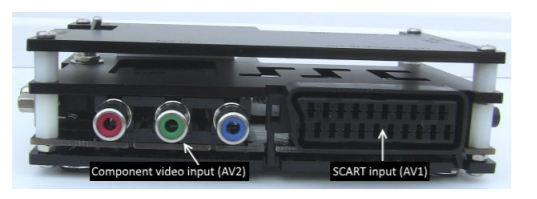
Many thanks in advance!

Am I correct in assuming that I need a composite or RGB cable ‘out’ from the Gamecube to use with the OSSC? I’ve copied in images below from the user manual for reference.
No, you need a component or RGB cable, OSSC does not support composite video (unless you use a transcoder/converter like the Koryuu)
Thank you very much (as you can tell I get confused between ‘component’ and ‘composite’!)
Would something like this be suitable? Packapunch Pro RGB
Yes although keep in mind you would be limited to 480i with that. For 480p, try something like the GCHD adapters https://videogameperfection.com/products/gchd-mk-ii-hdmi-hd-adapter-for-gamecube/
You also need compatible software (NTSC versions of games or homebrew like Swiss) to access 480p mode in Gamecube titles.
OK thanks – I think that is probably a bit too expensive for me (especially as I already spent quite a lot on the OSSC itself!)
I’m hoping the RGB + OSSC should at least make an improvement over standard composite cable (yellow, white and red) being plugged directly into my HD-TV.
Many thanks again for the help, really appreciated!
Not sure what territory you are in, but RGB out only exists on PAL Gamecubes, just so you know.
I am in a PAL location and only have a PAL gamecube and games.
Many thanks for the replies guys – really appreciated!
NewHome › Forums › OSSC, OSSC Pro and DExx-vd isl › OSSC – Discussion and support › Beginner Question – Gamecube through OSSC
Tagged: gamecube
Hi folks,
Beginner here with a beginner question! Very grateful if anyone can advise.
I have been using a Megadrive through the OSSC (Scart cable) and works wonderfully, no problems.
I’m now trying to connect my Gamecube. I have the standard AVI component cable with the GC (outputs to red, white, yellow)
I’ve tried plugging the AVI component into a scart adapter (just a straight adapter), then plugging the scart into the OSSC (pictured AV1). The sound gets through but no visuals.
Am I correct in assuming that I need a composite or RGB cable ‘out’ from the Gamecube to use with the OSSC? I’ve copied in images below from the user manual for reference.

Many thanks in advance!
Am I correct in assuming that I need a composite or RGB cable ‘out’ from the Gamecube to use with the OSSC? I’ve copied in images below from the user manual for reference.
No, you need a component or RGB cable, OSSC does not support composite video (unless you use a transcoder/converter like the Koryuu)
Thank you very much (as you can tell I get confused between ‘component’ and ‘composite’!)
Would something like this be suitable? Packapunch Pro RGB
Yes although keep in mind you would be limited to 480i with that. For 480p, try something like the GCHD adapters https://videogameperfection.com/products/gchd-mk-ii-hdmi-hd-adapter-for-gamecube/
You also need compatible software (NTSC versions of games or homebrew like Swiss) to access 480p mode in Gamecube titles.
OK thanks – I think that is probably a bit too expensive for me (especially as I already spent quite a lot on the OSSC itself!)
I’m hoping the RGB + OSSC should at least make an improvement over standard composite cable (yellow, white and red) being plugged directly into my HD-TV.
Many thanks again for the help, really appreciated!
Oh yes the RGB cable will be quite a bit better than just composite.
Not sure what territory you are in, but RGB out only exists on PAL Gamecubes, just so you know.
Oh yes that’s true, totally forgot about that.
I am in a PAL location and only have a PAL gamecube and games.
Many thanks for the replies guys – really appreciated!
| Cookie | Duration | Description |
|---|---|---|
| _gat | 1 minute | This cookie is installed by Google Universal Analytics to restrain request rate and thus limit the collection of data on high traffic sites. |
| Cookie | Duration | Description |
|---|---|---|
| __gads | 1 year 24 days | The __gads cookie, set by Google, is stored under DoubleClick domain and tracks the number of times users see an advert, measures the success of the campaign and calculates its revenue. This cookie can only be read from the domain they are set on and will not track any data while browsing through other sites. |
| _ga | 2 years | The _ga cookie, installed by Google Analytics, calculates visitor, session and campaign data and also keeps track of site usage for the site's analytics report. The cookie stores information anonymously and assigns a randomly generated number to recognize unique visitors. |
| _gid | 1 day | Installed by Google Analytics, _gid cookie stores information on how visitors use a website, while also creating an analytics report of the website's performance. Some of the data that are collected include the number of visitors, their source, and the pages they visit anonymously. |
| Cookie | Duration | Description |
|---|---|---|
| IDE | 1 year 24 days | Google DoubleClick IDE cookies are used to store information about how the user uses the website to present them with relevant ads and according to the user profile. |
| test_cookie | 15 minutes | The test_cookie is set by doubleclick.net and is used to determine if the user's browser supports cookies. |
| Cookie | Duration | Description |
|---|---|---|
| ct_checked_emails | session | No description |
| ct_has_scrolled | session | No description |
| ct_mouse_moved | session | No description |
| ct_screen_info | session | No description |
| wordpress_apbct_antibot | session | No description |
| wp_woocommerce_session_9cc3598a6315be16da4f85bb374cf6a5 | 2 days | No description |
