
Freesync VRR
- This topic has 10 replies, 3 voices, and was last updated December 30, 2024 at 3:29 PM by .
- You must be logged in to reply to this topic.

NewHome › Forums › OSSC, OSSC Pro and DExx-vd isl › OSSC – Discussion and support › Freesync VRR
<p style=”text-align: left;”>Hi, I am connecting my Mister to OSSC pro using direct video via HDMI. I am using a LG C4 OLED TV. How can I get the OSSC pro to output VRR?</p>
When I had the Mister connected directly to my TV via HDMI (not direct video) it worked great. My TV would recognize and switch to VRR freesync. BTW, I have Mister.ini set to low lag and VRR freesync. It’s just when I output to OSSC pro my TV doesn’t recognize the VRR.
Yes. I enabled the VRR flag. Is there anything else I need to enable?
I am using line multiplier both adaptive and pure.
Do you have same result if you set vrr_mode=2 and vrr_max_framerate=144 in mister.ini? Pro currently only sets Freesync output flags, and does not support VESA VRR. It doesn’t either read display’s EDID and sets relevant metadata blindly.
Unfortunately yes. Even after changing the VRR max frame rate in the mister.ini it my TV still doesn’t doesn’t switch to VRR.
So apparently the TV does not support Freesync, only VESA VRR. At some point support for VESA VRR may be added on OSSC as well, but keep in mind that VRR in this context is only a workaround for TV issues and does not improve anything if TV handles non-VRR signal properly.
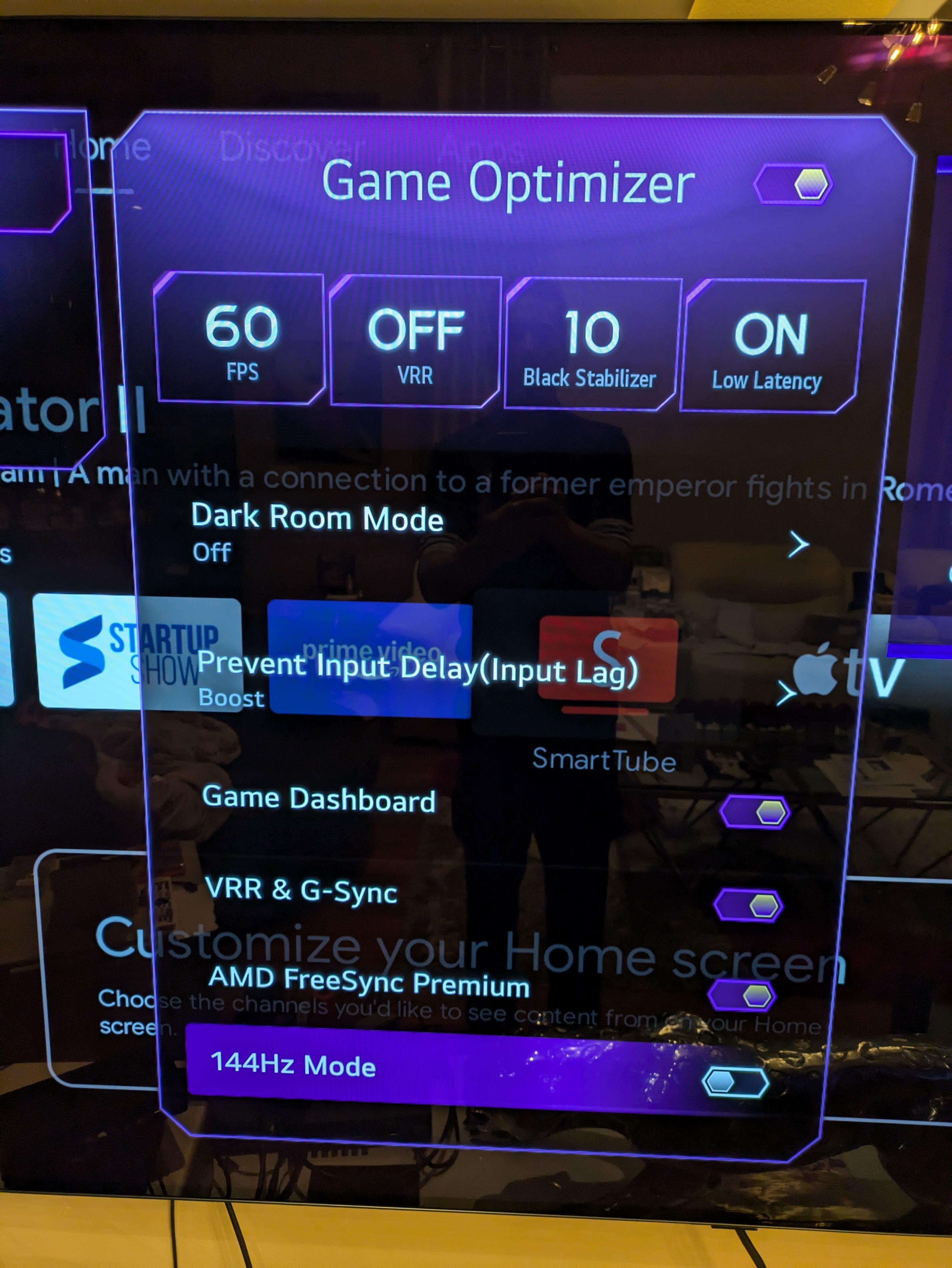
<p style=”text-align: left;”>Hi marqs. Do you mean my television? It’s a LG C4 OLED. I attached a picture of the settings.</p>
It has VRR and both g-sync and amd freesync. The VRR works when I connect directly from the Mister FPGA to the television.
The VRR works when I connect directly from the Mister FPGA to the television.
Didn’t you just say that Mister with vrr_mode=2 (freesync) did not switch TV into VRR mode?
Correct but that’s only when the Mister is connected to the OSSC pro then to the television.
It seems there is an issue in infoframe checksum calculation. This will be fixed in next fw.
NewHome › Forums › OSSC, OSSC Pro and DExx-vd isl › OSSC – Discussion and support › Freesync VRR
<p style=”text-align: left;”>Hi, I am connecting my Mister to OSSC pro using direct video via HDMI. I am using a LG C4 OLED TV. How can I get the OSSC pro to output VRR?</p>
When I had the Mister connected directly to my TV via HDMI (not direct video) it worked great. My TV would recognize and switch to VRR freesync. BTW, I have Mister.ini set to low lag and VRR freesync. It’s just when I output to OSSC pro my TV doesn’t recognize the VRR.
You’ve enabled VRR on the OSSC Pro too?
Yes. I enabled the VRR flag. Is there anything else I need to enable?
I am using line multiplier both adaptive and pure.
Do you have same result if you set vrr_mode=2 and vrr_max_framerate=144 in mister.ini? Pro currently only sets Freesync output flags, and does not support VESA VRR. It doesn’t either read display’s EDID and sets relevant metadata blindly.
Unfortunately yes. Even after changing the VRR max frame rate in the mister.ini it my TV still doesn’t doesn’t switch to VRR.
So apparently the TV does not support Freesync, only VESA VRR. At some point support for VESA VRR may be added on OSSC as well, but keep in mind that VRR in this context is only a workaround for TV issues and does not improve anything if TV handles non-VRR signal properly.
<p style=”text-align: left;”>Hi marqs. Do you mean my television? It’s a LG C4 OLED. I attached a picture of the settings.</p>
It has VRR and both g-sync and amd freesync. The VRR works when I connect directly from the Mister FPGA to the television.
The VRR works when I connect directly from the Mister FPGA to the television.
Didn’t you just say that Mister with vrr_mode=2 (freesync) did not switch TV into VRR mode?
Correct but that’s only when the Mister is connected to the OSSC pro then to the television.
It seems there is an issue in infoframe checksum calculation. This will be fixed in next fw.
Ok great. Thank you!
| Cookie | Duration | Description |
|---|---|---|
| _gat | 1 minute | This cookie is installed by Google Universal Analytics to restrain request rate and thus limit the collection of data on high traffic sites. |
| Cookie | Duration | Description |
|---|---|---|
| __gads | 1 year 24 days | The __gads cookie, set by Google, is stored under DoubleClick domain and tracks the number of times users see an advert, measures the success of the campaign and calculates its revenue. This cookie can only be read from the domain they are set on and will not track any data while browsing through other sites. |
| _ga | 2 years | The _ga cookie, installed by Google Analytics, calculates visitor, session and campaign data and also keeps track of site usage for the site's analytics report. The cookie stores information anonymously and assigns a randomly generated number to recognize unique visitors. |
| _gid | 1 day | Installed by Google Analytics, _gid cookie stores information on how visitors use a website, while also creating an analytics report of the website's performance. Some of the data that are collected include the number of visitors, their source, and the pages they visit anonymously. |
| Cookie | Duration | Description |
|---|---|---|
| IDE | 1 year 24 days | Google DoubleClick IDE cookies are used to store information about how the user uses the website to present them with relevant ads and according to the user profile. |
| test_cookie | 15 minutes | The test_cookie is set by doubleclick.net and is used to determine if the user's browser supports cookies. |
| Cookie | Duration | Description |
|---|---|---|
| ct_checked_emails | session | No description |
| ct_has_scrolled | session | No description |
| ct_mouse_moved | session | No description |
| ct_screen_info | session | No description |
| wordpress_apbct_antibot | session | No description |
| wp_woocommerce_session_9cc3598a6315be16da4f85bb374cf6a5 | 2 days | No description |