
How to flash with J-Link
NewHome › Forums › OSSC, OSSC Pro and DExx-vd isl › OSSC – DIY & Repair Support › How to flash with J-Link
Tagged: jtag
- This topic has 3 replies, 2 voices, and was last updated April 11, 2025 at 6:07 AM by
spacesaver.

-
AuthorPosts
-
April 9, 2025 at 2:25 PM #65676
My OSSC 1.7 stopped booting (no text on LCD). What is the pin out if I want to reflash with a J-Link? I can’t figure how these pins map to those on the 10 pin connector:
https://www.segger.com/products/debug-probes/j-link/technology/interface-description/
https://www.terasic.com.tw/wiki/Terasic_USB_Blaster_revB_Manual
-
This topic was modified 1 year, 6 months ago by
April 10, 2025 at 2:02 PM #65688OK, I found the mapping. https://www.segger.com/products/debug-probes/j-link/accessories/adapters/intel-fpga-adapter. What wasn’t clear earlier is TRGNCE & TRGNCSO.
But apparently, the JLink 9.3 I have doesn’t support Cyclone IV.
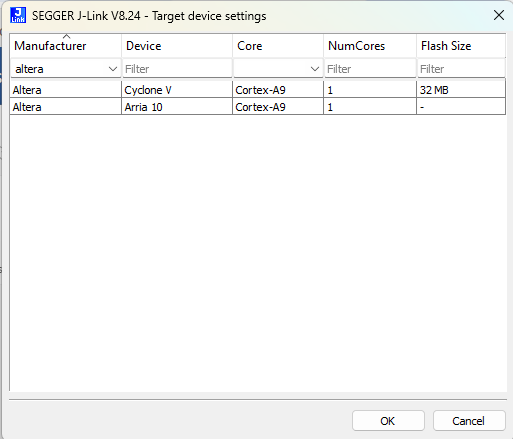
Connecting to J-Link via USB…O.K.
Firmware: J-Link V9 compiled May 7 2021 16:26:12
Hardware version: V9.30
J-Link uptime (since boot): N/A (Not supported by this model)
S/N: 269305968
License(s): FlashBP, GDB
OEM: SEGGER-EDU
VTref=2.534VType “connect” to establish a target connection, ‘?’ for help
J-Link>connect
Please specify device / core. <Default>: CORTEX-A9
Type ‘?’ for selection dialog
Device>?
Please specify target interface:
J) JTAG (Default)
S) SWD
T) cJTAG
TIF>J
Device position in JTAG chain (IRPre,DRPre) <Default>: -1,-1 => Auto-detect
JTAGConf>
Specify target interface speed [kHz]. <Default>: 4000 kHz
Speed>1000 khz
Device “CYCLONE V” selected.Connecting to target via JTAG
ConfigTargetSettings() start
ConfigTargetSettings() end – Took 9us
TotalIRLen = 10, IRPrint = 0x0155
JTAG chain detection found 1 devices:
#0 Id: 0x020F20DD, IRLen: 10, Unknown device
Connect failed. Resetting via Reset pin and trying again.
ConfigTargetSettings() start
ConfigTargetSettings() end – Took 4us
TotalIRLen = 10, IRPrint = 0x0155
JTAG chain detection found 1 devices:
#0 Id: 0x020F20DD, IRLen: 10, Unknown device****** Error: CPU-TAP not found in JTAG chain
Error occurred: Could not connect to the target device
April 10, 2025 at 11:52 PM #65696It seems to natively only support debug of HPS core on Cyclone V etc. You can probably use it as general JTAG programmer with urjtag or openocd too, but in this case you need to first compile/convert FPGA bitstream to SVF file and program that.
April 11, 2025 at 6:07 AM #65697Pretty disappointing. I thought J-Link supported everything. Apparently not, or Altera decided to use some proprietary debug protocol built on top of JTAG. I’ve found a used Terasic probe on eBay, so will use that.
It would be a shame if the problem is not corrupt firmware. I don’t see how it can get corrupted. I did leave OSSC always on.
-
This reply was modified 1 year, 6 months ago by
-
This topic was modified 1 year, 6 months ago by
-
AuthorPosts


- You must be logged in to reply to this topic.
