
Huge cut off crt
NewHome › Forums › OSSC, OSSC Pro and DExx-vd isl › OSSC – Discussion and support › Huge cut off crt
- This topic has 10 replies, 4 voices, and was last updated July 31, 2026 at 3:18 PM by
Kekstier.

-
AuthorPosts
-
July 30, 2026 at 2:52 PM #70298
So I got with a ossc pro on my CRT a huge cut off when I use it on my pc with it and have to make the screen smaller in the Nvidia settings to fit it on screen because when I try to change the geometry on my TV it does show no picture at a specific line when I make the picture smaller
I only seen the advanced timing resizing but that is limited and doesn’t do the job
So I wanted to connect my anbernic rgxx devices and the screen is cut off by a large amount
Is there somewhere a other setting to make the whole picture smaller?
July 30, 2026 at 3:13 PM #70299What kind of CRT are you connecting?
Does the CRT itself have picture sizing controls?
Can you post a picture of the overscan?
July 30, 2026 at 4:16 PM #70300<p style=”text-align: left;”>A bang and olfuson mx7000</p>
Yeah has it in the settings to resize geometryI’m currently not home it’s just a black picture cut off on the top
July 30, 2026 at 5:51 PM #70301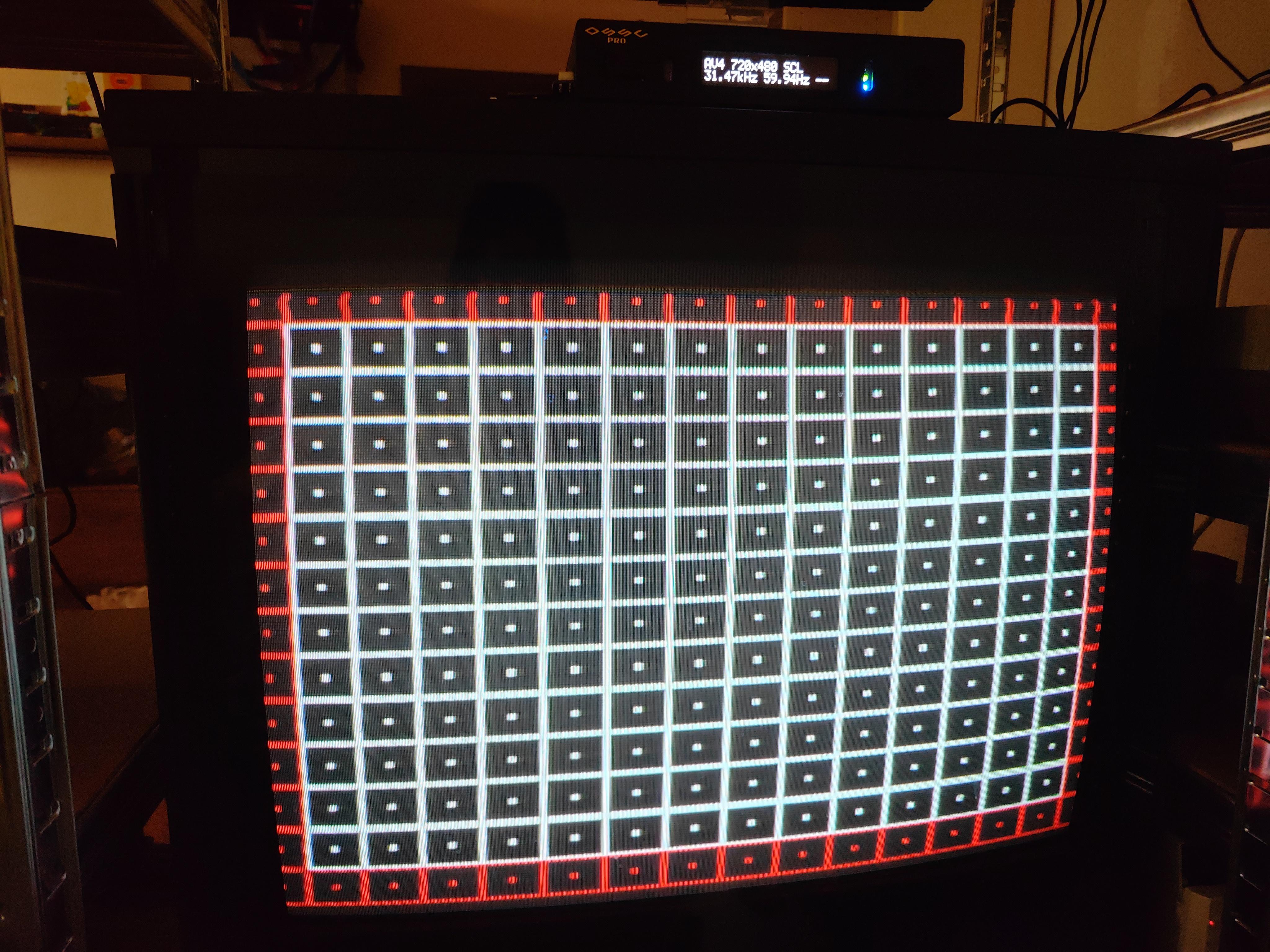
-
This reply was modified 2 months, 3 weeks ago by
RainerLeuteritz.
July 30, 2026 at 6:42 PM #70303The top is black even with the screen adjusted way beyond the bars
Ignore the right and left side didn’t resize them
July 30, 2026 at 7:27 PM #70304Got it to work in adv display timing in the output option you can do there more then in the Scaler option
July 31, 2026 at 12:06 AM #70313Which output resolution and aspect ratio do you use? Under output opt. you also find “Adv. disp timing” where you can adjust output parameters. Typically it’s recommended to do the adjustments using the built-in test-pattern using the output preset you use in Scaler mode.
July 31, 2026 at 5:46 AM #70315On pc 960p and on the rgxx 480p
Both are 4:3
July 31, 2026 at 11:56 AM #70323Based on your picture I wouldn’t call that a “huge cut off” at all, that seems quite normal for a consumer CRT. Anything within the red area is considered in danger of being cropped by a CRTs overscan.
July 31, 2026 at 3:04 PM #70324Hello,
I had the same “problem” with my signal chain (mini pc via hdmi -> ossc pro -> panasonic crt [consumer tv] via scart)…
You would can solve it, if you set your pc to 720p in tv norm (in the advanced dialog of windows 11 pro) and use the scaler-mode, which are able to shrunken the picture, when necessary! The 720p signal was noticed by ossc pro and can convert easily to 480p / 480i…. But the scaler-mode is for me the absolut “ultima ratio”, when nothing is possible!
But I use more the A-LM-Mode, scaling is set by the emulator and the service menue of the CRT!For e.g. SNES in 720p you have to set the aspect ratio to the original pixel x 3, in this case: 256*3 and 244*3… so the original picture by the mini pc has no overscan! For other platforms you have a same approach!
Second the ossc pro has to set to LM-A Mode and Line-Dropping to 480p, maybe you have to set the position (porch) to take the picture to the middle of the crt area…
Third you have to adjust possible overscan via the aspect ratio settings of your crt (mostly “aspect”, “full / total”, “zoom” or at the one!) or you use the service menue of your CRT, nearly every CRT company has a service menue access for engineers or technics… in the geometry parameters you can shrunken the picture to the wished area!I have only 1 cm (1/2″) overscan to every side! Be aware when you see trash pixel on the borders of your picture or maybe a blue line on the edge of the crt area, when the signal area is too small!
-
This reply was modified 2 months, 3 weeks ago by
July 31, 2026 at 3:18 PM #70326If you are to the end of the capacities of the scaler mode, you can in 720p in advanced timings in output mode (“overclock”) to H.active and V.active maybe -10 or so (e.g. V.active = 230 works in most of the cases), more the picture is also cropped … i would keep the original timings for the output mode and set the rest via service menue of your crt!
-
This reply was modified 2 months, 3 weeks ago by
-
AuthorPosts


- You must be logged in to reply to this topic.
