


No Audio – Sega Genesis Model 2 MK-1631 With HD Retrovision Component Cable
NewHome › Forums › OSSC, OSSC Pro and DExx-vd isl › OSSC – Discussion and support › No Audio – Sega Genesis Model 2 MK-1631 With HD Retrovision Component Cable
Tagged: audio, genesis, hd retrovision, ossc, Sega, sega genesis, trouble shooting
- This topic has 5 replies, 2 voices, and was last updated October 21, 2022 at 10:36 AM by
BuckoA51.
-
AuthorPosts
-
September 17, 2022 at 7:36 AM #54915
Hello!
I’m really hoping someone can help me with this.
I have tried everything and had no luck.I CANNOT get any audio output to play on my television.
I CAN get video output to play on my television.I have a Sega Genesis Model 2 MK-1631
I have an HD Retrovision Cable
I have the OSSC unit version 1.7I have connected my Sega Genesis Model 2 to the HD Retrovision Cable using the RF port on the back of the unit
I have connected the HD Retrovision Cable to the OSSC unit’s AV2 (YPbPr) port on the back
I have reset the OSSC settings to default multiple times
I have tried multiple different settings and combinations
I have upgraded the firmware to version 0.90a (with the audio version)Yet now matter what I do no audio comes through to my TV.
Is there something I’m doing wrong? Is there something I’m missing? I have looked at the HD Retrovision documentation here
https://www.hdretrovision.com/faqI have looked at the HD Retrovision troubleshooting here
https://www.hdretrovision.com/troubleshootingI have tried looking through the Video Game Perfection OSSC Forum here
I have tried quick start suggestions from the guide here
https://videogameperfection.com/support-files/ossc-quickstart.pdfYet nothing works!
I appreciate any help or guidance on this.
September 17, 2022 at 10:52 AM #54918Did you check that the audio was connected to the correct 3.5mm input on OSSC? Are you sure your 3.5mm to RCA adapter works?
September 17, 2022 at 10:42 PM #54927@BuckoA51 This is a Sega Genesis Model 2. From my understanding I shouldn’t need to connect the 3.5mm jack to the Retrovision HD cable. Additionally, I don’t believe there is an audio connection to make on the Model 2
See this image for the back ports
https://gametrog.com/wp-content/uploads/2018/07/sega-genesis-2-back-gametrog.pngTo my knowledge this should be plug-n-play where the hd retrovision connects to the model 2’s rf port, and then connects directly to the OSSC AV2 Composite ports
September 18, 2022 at 5:58 PM #54938Not sure who told you that. You can’t expect audio from any component video source if you don’t connect the audio connectors to the OSSC somehow, no matter what console you use.
September 30, 2022 at 9:22 AM #55107Hello!
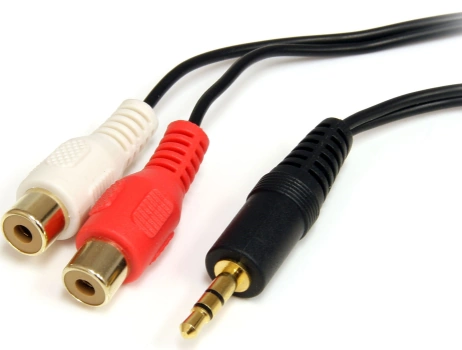
For anyone else who has this issue, my solution was to buy a red/white audio cable to 3.5mm jack that plugged into one of the audio ports of the OSSC.
See this for an example:
I don’t know why I didn’t pick up on this in any of the information above. But the gist of it is, is that the HD Retrovision splits the signal into a set of 3 video plugs and 2 audio plugs, all of which have to be run through the OSSC device.
The Sega Model 1 and Model 2 are different in how the audio piece is set up and I misunderstood that the model 2 piece still needed this.
Thanks for all the help everyone!
October 21, 2022 at 10:36 AM #55431The cable you show is back to front, you want 2 x RCA female to 3.5mm male.
-
AuthorPosts
- You must be logged in to reply to this topic.

