Odd AV3 input issue on OSSC
- This topic has 4 replies, 4 voices, and was last updated September 13, 2024 at 11:29 PM by .
- You must be logged in to reply to this topic.
NewHome › Forums › OSSC, OSSC Pro and DExx-vd isl › OSSC – Discussion and support › Odd AV3 input issue on OSSC
I hooked up my OSSC to my San Francisco Rush 2049 cabinet to do some video capture, but for some reason the VGA input signal is giving me issues.
https://www.youtube.com/watch?v=NEny1O3LsG8 Here’s a link to what it is doing, when I go on the ramp there’s an orange tint that bleeds out onto more of the screen like the sky, while reversing makes it vanish. Other color oddities like this happen elsewhere, but this is the most obvious one I’ve seen. This does not appear on the stock monitor or another VGA CRT at all. At first I thought it was the generic powered VGA splitter that I had connected, but direct connection from the game’s Voodoo3 to AV3 with a good quality VGA cable does the same thing. I also confirmed it was not my capture device by hooking the HDMI of the OSSC to another monitor, where it still showed.
I also tested it on a DVI OSSC on a much older firmware, and the same thing happens as my v1.11A HDMI unit. Hooking something like a NAOMI up to AV3 with the same cables produces a clear image, so I’m not sure what is wrong here. The video signal itself should be nothing out of the ordinary either, just a 640×480 signal:
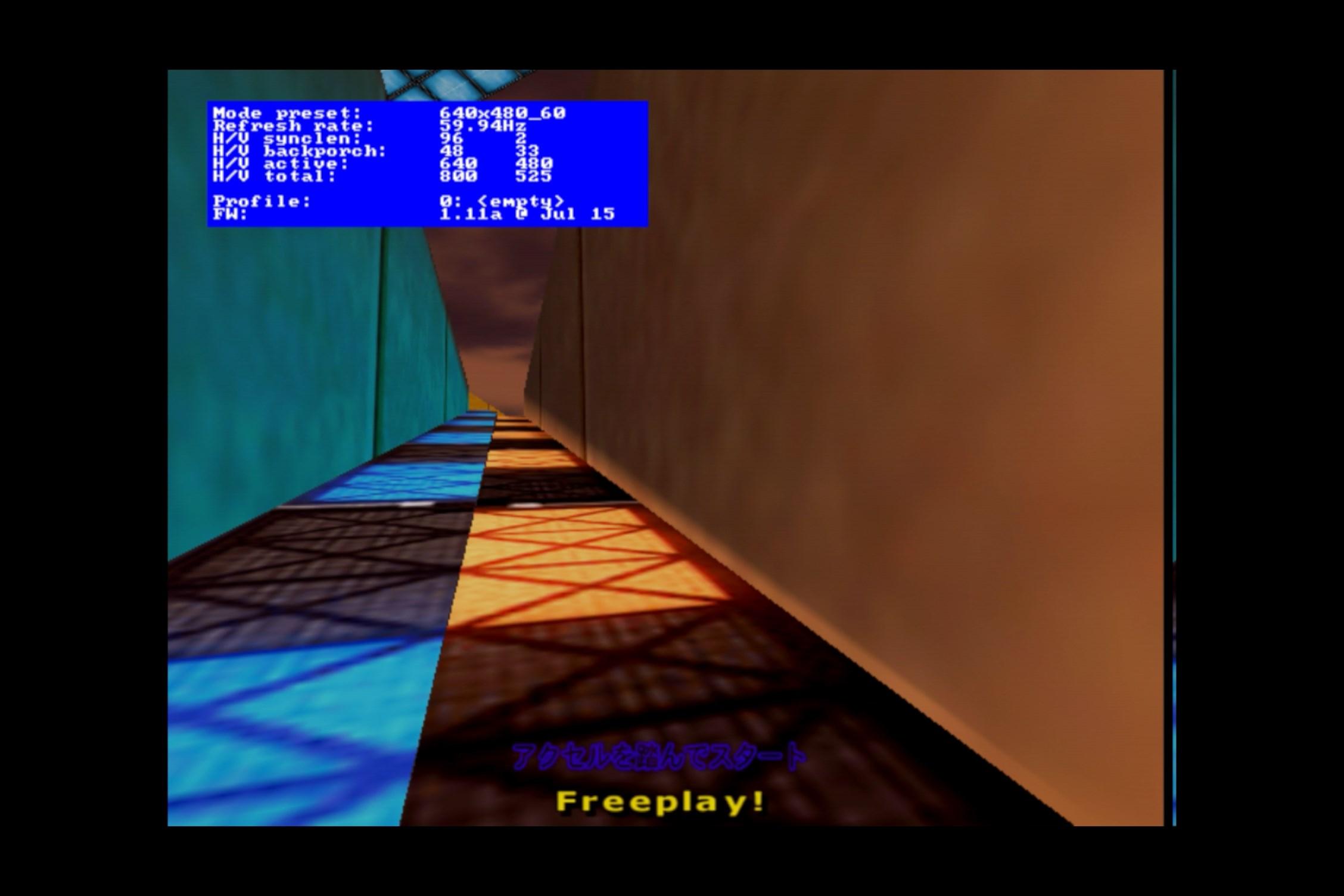
I think I’ve messed with most of the options that I would think might be related, but any other ideas would be appreciated!

This is just a hunch and I could be talking absolute nonsense but, can you play with the horizontal backporch value see if that changes anything?
It’s more likely to be related to clamp and ALC, please try adjusting those settings in the menu.
Awesome, setting the Clamp/ALC offset to -10 from the original 0 made it look perfect. I did adjust the horizontal backporch too to correct that single line on the very right moving back to the left edge where it should be, so both settings ended up helping it look fantastic 😁
NewHome › Forums › OSSC, OSSC Pro and DExx-vd isl › OSSC – Discussion and support › Odd AV3 input issue on OSSC
I hooked up my OSSC to my San Francisco Rush 2049 cabinet to do some video capture, but for some reason the VGA input signal is giving me issues.
https://www.youtube.com/watch?v=NEny1O3LsG8 Here’s a link to what it is doing, when I go on the ramp there’s an orange tint that bleeds out onto more of the screen like the sky, while reversing makes it vanish. Other color oddities like this happen elsewhere, but this is the most obvious one I’ve seen. This does not appear on the stock monitor or another VGA CRT at all. At first I thought it was the generic powered VGA splitter that I had connected, but direct connection from the game’s Voodoo3 to AV3 with a good quality VGA cable does the same thing. I also confirmed it was not my capture device by hooking the HDMI of the OSSC to another monitor, where it still showed.
I also tested it on a DVI OSSC on a much older firmware, and the same thing happens as my v1.11A HDMI unit. Hooking something like a NAOMI up to AV3 with the same cables produces a clear image, so I’m not sure what is wrong here. The video signal itself should be nothing out of the ordinary either, just a 640×480 signal:

I think I’ve messed with most of the options that I would think might be related, but any other ideas would be appreciated!
This is just a hunch and I could be talking absolute nonsense but, can you play with the horizontal backporch value see if that changes anything?
It’s more likely to be related to clamp and ALC, please try adjusting those settings in the menu.
Awesome, setting the Clamp/ALC offset to -10 from the original 0 made it look perfect. I did adjust the horizontal backporch too to correct that single line on the very right moving back to the left edge where it should be, so both settings ended up helping it look fantastic 😁
Awesome, nice tech support!
| Cookie | Duration | Description |
|---|---|---|
| _gat | 1 minute | This cookie is installed by Google Universal Analytics to restrain request rate and thus limit the collection of data on high traffic sites. |
| Cookie | Duration | Description |
|---|---|---|
| __gads | 1 year 24 days | The __gads cookie, set by Google, is stored under DoubleClick domain and tracks the number of times users see an advert, measures the success of the campaign and calculates its revenue. This cookie can only be read from the domain they are set on and will not track any data while browsing through other sites. |
| _ga | 2 years | The _ga cookie, installed by Google Analytics, calculates visitor, session and campaign data and also keeps track of site usage for the site's analytics report. The cookie stores information anonymously and assigns a randomly generated number to recognize unique visitors. |
| _gid | 1 day | Installed by Google Analytics, _gid cookie stores information on how visitors use a website, while also creating an analytics report of the website's performance. Some of the data that are collected include the number of visitors, their source, and the pages they visit anonymously. |
| Cookie | Duration | Description |
|---|---|---|
| IDE | 1 year 24 days | Google DoubleClick IDE cookies are used to store information about how the user uses the website to present them with relevant ads and according to the user profile. |
| test_cookie | 15 minutes | The test_cookie is set by doubleclick.net and is used to determine if the user's browser supports cookies. |
| Cookie | Duration | Description |
|---|---|---|
| ct_checked_emails | session | No description |
| ct_has_scrolled | session | No description |
| ct_mouse_moved | session | No description |
| ct_screen_info | session | No description |
| wordpress_apbct_antibot | session | No description |
| wp_woocommerce_session_9cc3598a6315be16da4f85bb374cf6a5 | 2 days | No description |
