
OSSC not picking up DOS screen
NewHome › Forums › OSSC, OSSC Pro and DExx-vd isl › OSSC – Discussion and support › OSSC not picking up DOS screen
- This topic has 5 replies, 3 voices, and was last updated July 16, 2026 at 8:24 PM by
Tony359.

-
AuthorPosts
-
August 12, 2023 at 10:43 AM #57736
Hi there,
I have an issue with my OSSC, v. 1.7.
When I run DOOM the LCD display shows a signal locked but there is no output – at least none my HDMI capture device can see.
If I switch to say RGBS and back to RGBHV, a slightly different signal is detected and the HDMI capture device immediately displays it.
This is VGA from a VGA integrated graphic card of a motherboard, https://theretroweb.com/motherboards/s/pcchips-m571-v3.2-a
I tested DOOM before with a PCI video card and didn’t have this issue.
Is there anything I can tweak on the OSSC to avoid this issue?
I cannot figure out a way to upload pictures so…
with No video: 449-p 31.50kHz 70.16Hz
With video: 450-p 31.32kHz 69.60Hz
Thank you!
August 12, 2023 at 10:56 AM #57737Pictures can be uploaded by clicking the little picture of a picture button on the toolbar next to the chain icon.
Unfortunately no there’s no way to avoid this on the current 1.7 hardware though I would be very interested if you are willing to try 1.8 and see if this is resolved. Upgrading your OSSC to 1.8 will require a small hardware modification though, see this thread for more details:-
August 12, 2023 at 11:11 AM #57738I tried uploading two pictures but I get a “broken link” – I tried resizing them first but I got a blank section. I didn’t want to flood the forum with tests so I typed instead!
Ah, so that’s a 1.7 known issue? Does it happen under specific conditions? I’ll check the link you provided, I have no issues modifying the PCB.
Thanks!
July 15, 2026 at 5:55 PM #70150This is a very old thread I opened but it’s the same subject.
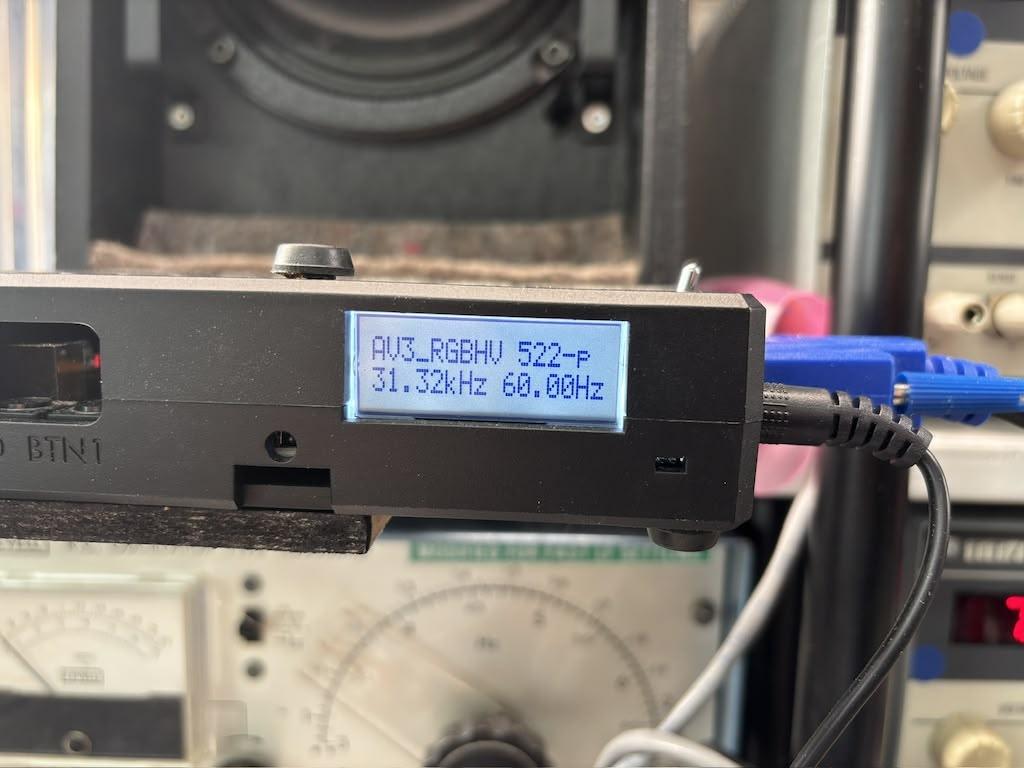
I’m still seeing this issue: the OSSC shows a locked input but the GREEN power on light is turned OFF and I have no output. If I unplug and re-plug the VGA cable (or if I toggle a different input and back to the original one), the display shows the very same locked input but this time the green LED is on and I have an input.
@buckoA51 mentioned it was a 1.7 issue. Meanwhile I did mod my OSSC and upgraded to 1.xx firmware. Does that make it HW 1.8? Or does the 1.8 bring other improvements which can avoid this annoying issue? I spent an afternoon troubleshooting a system and turned out it was just the OSSC in need of a nudge 🙂I was on 1.21 and then downgraded to 1.12 but the same happened. I was testing Tomb Raider in MSDOS and OSSC would intermittently fail to show an output on the main menu or the main game. See picture below where the video is locked but there is no green light. Any advice would be appreciated!
Thanks!
 July 15, 2026 at 11:25 PM #70155
Only the firmware version is relevant, not the HW revision (assuming <1.8 is modified to support latest fw). My guess that the problem lies with the video ADC which may semi-consistently fail lock into certain signals which is not so easy to detect & fix. You could try enabling “Full VSYNC bypass” from compatibility menu which was added to address somewhat similar issue with MDA cards.
July 16, 2026 at 8:24 PM #70166Thank you so much, I’ll give that a go. (Edit: I tried and unfortunately it doesn’t help)
A friend of mine has an OSSC (hw rev 1.8) and he tells me he’s never had this issue – maybe just a couple of times. It seems to be quite common on my unit though. Besides that, I have no issues.
Could it be something HW related? My friend plays with DOS resolutions all the time 🙂
-
This reply was modified 2 months, 4 weeks ago by
-
This reply was modified 2 months, 4 weeks ago by
-
AuthorPosts


- You must be logged in to reply to this topic.
