OSSC Pro – Horizontal Double Image in Scaler Mode (PS2 Component)
- This topic has 4 replies, 3 voices, and was last updated June 16, 2025 at 5:01 PM by .
- You must be logged in to reply to this topic.
NewHome › Forums › OSSC, OSSC Pro and DExx-vd isl › OSSC – Discussion and support › OSSC Pro – Horizontal Double Image in Scaler Mode (PS2 Component)
Hi all,
Hoping someone here can help shed some light on a strange issue I’m having with my OSSC Pro.
Everything had been working great for the 2 weeks I’ve had it — I’ve been using the OSSC Pro with my PlayStation 2 via component input, solely in Scaler Mode. All firmware and settings were on default, and I hadn’t made any tweaks to the settings.
What happened:
Out of the blue, the image started rapidly switching resolutions/sync.
I powered the unit off.
When I turned it back on, Scaler Mode now has a persistent double image — horizontally offset by about a centimetre or so.
Line multiplication mode works fine — the issue seems isolated to Scaler Mode.
Troubleshooting I’ve tried so far:
Full profile reset.
Confirmed I’m on the latest firmware.
Verified that no SD card is inserted (as suggested by Matt Buxton).
Tried all available deinterlace modes — no change.
The problem remains only in Scaler Mode.
All cables, console, and input selections are unchanged from when it was previously working perfectly.
Attached is a photo of the issue.
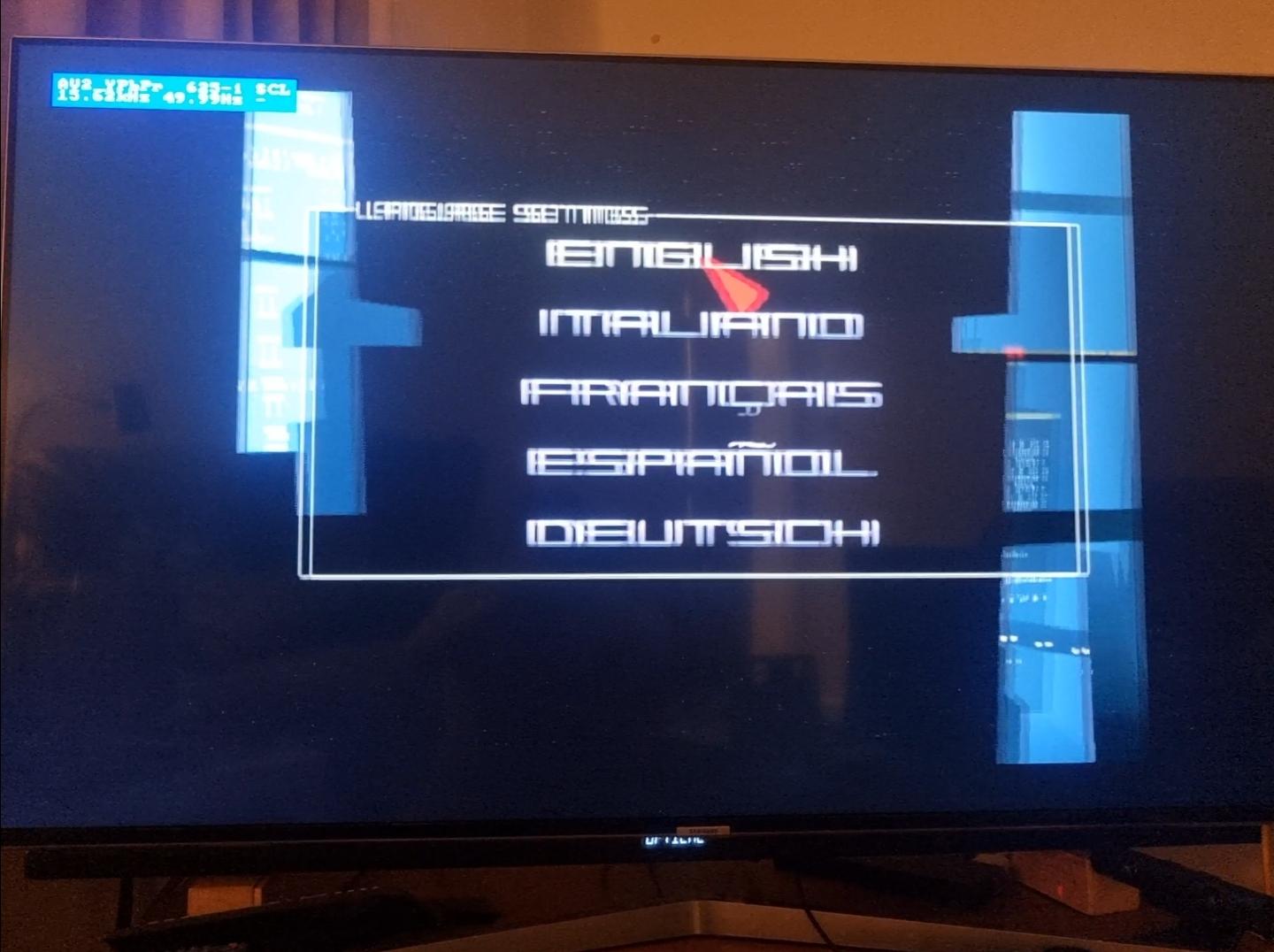
Matt suggested I post here so that @Markus or anyone else might have further ideas before considering returning the unit. It’d be heartbreaking if it’s already faulty, so I’m keen to exhaust all options first.
Any thoughts would be massively appreciated.
Thanks in advance,
Chris

This is the same issue which is reported here and which I’ve occasionally bumped into too, but it’s not easy to reproduce so I have only a hunch where the issue could be and this would need a larger undertaking to debug. You can unplug the power for a few seconds and everything should look normal once you restore power.
Cool, thanks very much for your reply. I didn’t think to unplug it.
I’m on holiday this weekend but will try on Monday and report back.
Thanks
I had this same issue show on the HDMI input. I resolved the issue by cycling the Pixel decimation from Auto(1x) to 1x then to 2x and it resolved. I then switched back to 1x then to Auto(1x) and it was fine without issues.
I know not directly related to the issue being that it was on a separate input. In doing this did trigger the OSSC Pro to resolve the issue without power cycling, if this helps at all Marqs

NewHome › Forums › OSSC, OSSC Pro and DExx-vd isl › OSSC – Discussion and support › OSSC Pro – Horizontal Double Image in Scaler Mode (PS2 Component)
Hi all,
Hoping someone here can help shed some light on a strange issue I’m having with my OSSC Pro.
Everything had been working great for the 2 weeks I’ve had it — I’ve been using the OSSC Pro with my PlayStation 2 via component input, solely in Scaler Mode. All firmware and settings were on default, and I hadn’t made any tweaks to the settings.
What happened:
Out of the blue, the image started rapidly switching resolutions/sync.
I powered the unit off.
When I turned it back on, Scaler Mode now has a persistent double image — horizontally offset by about a centimetre or so.
Line multiplication mode works fine — the issue seems isolated to Scaler Mode.
Troubleshooting I’ve tried so far:
Full profile reset.
Confirmed I’m on the latest firmware.
Verified that no SD card is inserted (as suggested by Matt Buxton).
Tried all available deinterlace modes — no change.
The problem remains only in Scaler Mode.
All cables, console, and input selections are unchanged from when it was previously working perfectly.
Attached is a photo of the issue.
Matt suggested I post here so that @Markus or anyone else might have further ideas before considering returning the unit. It’d be heartbreaking if it’s already faulty, so I’m keen to exhaust all options first.
Any thoughts would be massively appreciated.
Thanks in advance,
Chris
This is the same issue which is reported here and which I’ve occasionally bumped into too, but it’s not easy to reproduce so I have only a hunch where the issue could be and this would need a larger undertaking to debug. You can unplug the power for a few seconds and everything should look normal once you restore power.
Cool, thanks very much for your reply. I didn’t think to unplug it.
I’m on holiday this weekend but will try on Monday and report back.
Thanks
I had this same issue show on the HDMI input. I resolved the issue by cycling the Pixel decimation from Auto(1x) to 1x then to 2x and it resolved. I then switched back to 1x then to Auto(1x) and it was fine without issues.
I know not directly related to the issue being that it was on a separate input. In doing this did trigger the OSSC Pro to resolve the issue without power cycling, if this helps at all Marqs

Thanks for your replies, I unplugged it and everything is back to normal now 🙂
| Cookie | Duration | Description |
|---|---|---|
| _gat | 1 minute | This cookie is installed by Google Universal Analytics to restrain request rate and thus limit the collection of data on high traffic sites. |
| Cookie | Duration | Description |
|---|---|---|
| __gads | 1 year 24 days | The __gads cookie, set by Google, is stored under DoubleClick domain and tracks the number of times users see an advert, measures the success of the campaign and calculates its revenue. This cookie can only be read from the domain they are set on and will not track any data while browsing through other sites. |
| _ga | 2 years | The _ga cookie, installed by Google Analytics, calculates visitor, session and campaign data and also keeps track of site usage for the site's analytics report. The cookie stores information anonymously and assigns a randomly generated number to recognize unique visitors. |
| _gid | 1 day | Installed by Google Analytics, _gid cookie stores information on how visitors use a website, while also creating an analytics report of the website's performance. Some of the data that are collected include the number of visitors, their source, and the pages they visit anonymously. |
| Cookie | Duration | Description |
|---|---|---|
| IDE | 1 year 24 days | Google DoubleClick IDE cookies are used to store information about how the user uses the website to present them with relevant ads and according to the user profile. |
| test_cookie | 15 minutes | The test_cookie is set by doubleclick.net and is used to determine if the user's browser supports cookies. |
| Cookie | Duration | Description |
|---|---|---|
| ct_checked_emails | session | No description |
| ct_has_scrolled | session | No description |
| ct_mouse_moved | session | No description |
| ct_screen_info | session | No description |
| wordpress_apbct_antibot | session | No description |
| wp_woocommerce_session_9cc3598a6315be16da4f85bb374cf6a5 | 2 days | No description |