OSSC Remote interference
NewHome › Forums › OSSC, OSSC Pro and DExx-vd isl › OSSC – Discussion and support › OSSC Remote interference
- This topic has 6 replies, 5 voices, and was last updated November 9, 2020 at 11:58 PM by
Zacabeb.
-
AuthorPosts
-
December 9, 2017 at 11:10 AM #17908
Hi, just got my OSSC, it works great LG C7. However I am getting interference with my yahmha RRX-681 receiver. If push the volume down button, I change OSSC setting which make sync a problem, bebecause it changes sampling setting. Is they a way to fix this. Thank in advance.
December 9, 2017 at 4:57 PM #17918You could teach the OSSC a different code for that by using the remote setup procedure described on the wiki – http://junkerhq.net/xrgb/index.php?title=OSSC#Remote_control_setup
April 5, 2019 at 8:24 PM #25759Hi,
I just found this thread as I’m getting the same kind of issues with remotes interferences with the ossc, with a Yamaha receiver remote, and an LG tv remote too. Both interact with the ossc. Quite annoying.
But I’m quite confused with the procedure described on the junkerhq wiki…Doomisforu, did you managed to sort this issue out ?Thanks
November 9, 2020 at 9:59 PM #42726I’ve tried doing this, so I could document it clearly for other users facing the same problem but I’ve got stuck.
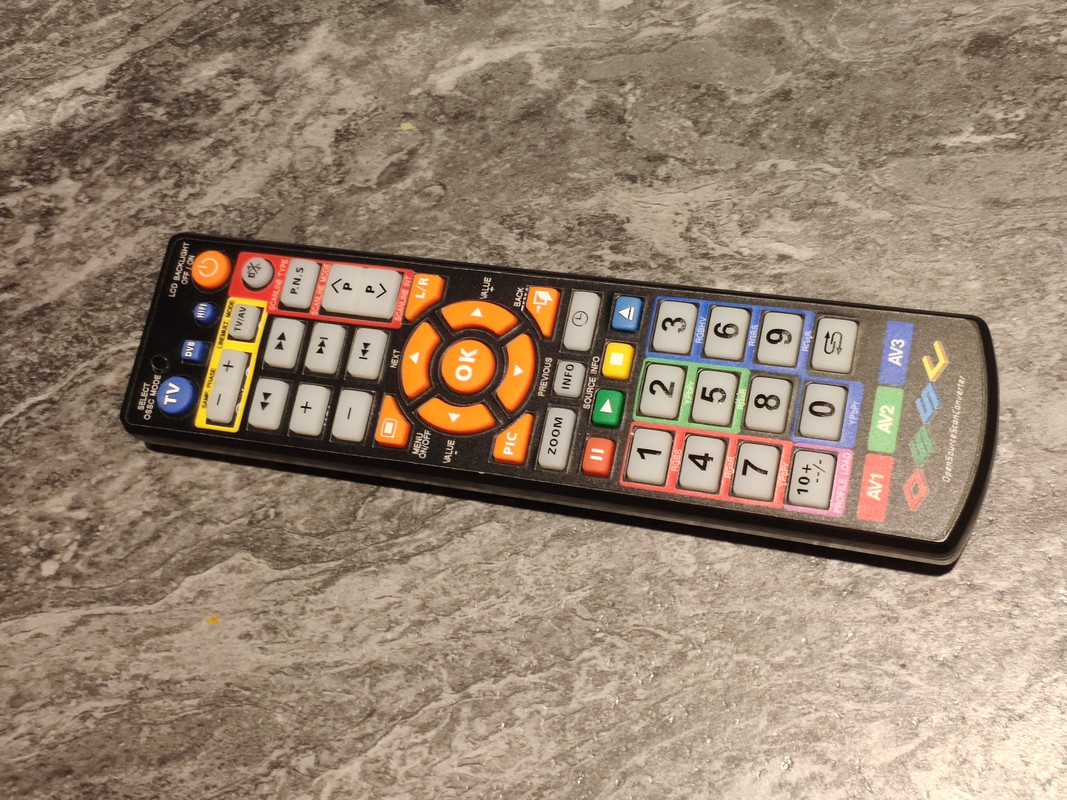
I had the problem that +/- vol on my Yamaha amp receiver was causing the OSSC to adjust phase +/-. So, I followed the advice on the wiki (hold BTN1 on OSSC boot to configure buttons), and proceeded aiming to re-program the OSSC from the OSSC remote, setting some dummy commands for phase +/- (as I do not use the function from the remote anyway). It started well.. on booting with BTN1 held, the OSSC OSD popped up asking me to press 1, confirm 1, press 2, confirm 2 etc, going through many of the buttons. However, when it got as far as asking me “Press LCD_BACKLIGHT”, the OSSC stopped responding to any button presses from the remote. So at this point, I picked up another remote (my bluray player) and it took the button presses from that, to move forward through the process. At the end of the process the picture came back (my N64).. but now NONE of the buttons on the OSSC remote did anything. e.g. the button I’d programmed for MENU (“MENU”) is not bringing up the menu. OK, so I thought I’d reset as per wiki instructions (press BTN0 at start of remote learning process).. but after doing that its the still the same, the OSSC remote is not controlling the OSSC, I can’t bring the menu up or anything.
This is the remote in question, which came with my OSSC https://i.postimg.cc/ydJd3Wcb/1604955689113.jpg
I even tried batteries from another remote, in case they had suddenly died, but that didn’t help either.
Any advice please? Many thanks.
November 9, 2020 at 10:19 PM #42730You might have accidentally pressed the DVB or HIFI buttons on the remote, switching it to a different control scheme. Pressing the TV button on it should hopefully bring it back to controlling the OSSC.
November 9, 2020 at 10:40 PM #42731Yes Zacabeb! That’s fixed it, thanks so much.
November 9, 2020 at 11:58 PM #42733No problem, I’m glad it worked. 🙂
-
AuthorPosts
- You must be logged in to reply to this topic.