OSSC with an Amiga: SCART vs VGA
- This topic has 3 replies, 3 voices, and was last updated December 27, 2021 at 11:13 PM by .
- You must be logged in to reply to this topic.
NewHome › Forums › OSSC, OSSC Pro and DExx-vd isl › OSSC – Discussion and support › OSSC with an Amiga: SCART vs VGA
Tagged: adapter, amiga, artifacts, buffer, buffered, cable, Noise, ossc, RGB, scart, VGA, Video noise, video quality
Hello everyone,
first and foremost thanks for having me here: I’ve been a lurker for some time and I am onto my first message, now. Thanks for your indirect help, so far. This place is a gold mine 🙂
I have an Amiga 1200 and an OSSC. Happily connected via RGB->SCART cable from the Amiga to the OSSC and then from the OSSC to my HDTV via an HDMI cable.
I am wondering:
1. Is an RGB-to-VGA cable going to be better than an RGB-to-SCART, quality-wise? Or is video quality only in that area only going to be dictated by other characteristics, like cable quality etc?
2. I built myself an RGB to VGA cable but I get a “no signal” from my OSSC when connecting it. It’s a simple cable with connections, no buffer or weird stuff. Do I need some kind of buffered converter?
In general I think most people are using a SCART cable, like I am.. but I was wondering if a VGA connection is going to yield better quality, for any number of reasons.
Thanks!

1) No, SCART is better for the Amiga with the OSSC.
The VGA input on the OSSC is really designed for clean, 31khz signals, the type you’d get from a PC. For the Amiga you’re dealing with 240p and 480i in games, so connecting via SCART will be better as this input has a low pass filter.
2) How did you connect sync? Did you choose RGBS input mode for AV3?
Totally agreed! Thanks for the input, that’s also what I found out. Thanks for confirming it.
I soldered my own RGB to SCART following Ian’s amazing guide: http://ianstedman.co.uk/amiga-scart-guide/
and used a VGA cable I had laying around, which has all separate shields + grounds plus an overall shield for the whole cable (nothing fancy, just typical “OK” VGA cables, but what I had before used a normal 8-wire cable with literally ZERO ground).
Not only does it work but it looks amazing and the noise is basically inexistent even at a gain of 12-13 inside Video in Proc.. I am super happy!
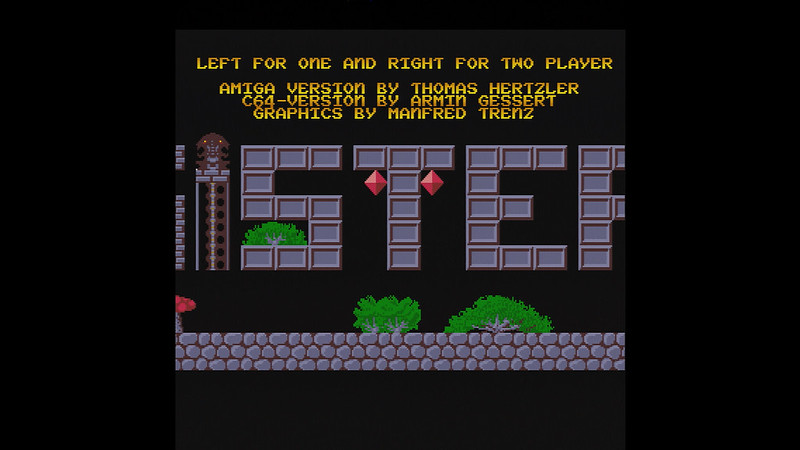
Hi for me on my Amiga 1200 23pin to VGA and then to OSSC VGA input did give me much better and cleaner picture
but maybe i have to test the 23pin to Scart again and see if i get any better signal but i do not think it can get any better then the VGA signal i have now it’s very sharp
OSSC Firmware 0.88a
here some pictures
OSSC -> DVDO iScan Duo -> Blackmagic intensity shuttle usb
NewHome › Forums › OSSC, OSSC Pro and DExx-vd isl › OSSC – Discussion and support › OSSC with an Amiga: SCART vs VGA
Tagged: adapter, amiga, artifacts, buffer, buffered, cable, Noise, ossc, RGB, scart, VGA, Video noise, video quality
Hello everyone,
first and foremost thanks for having me here: I’ve been a lurker for some time and I am onto my first message, now. Thanks for your indirect help, so far. This place is a gold mine 🙂
I have an Amiga 1200 and an OSSC. Happily connected via RGB->SCART cable from the Amiga to the OSSC and then from the OSSC to my HDTV via an HDMI cable.
I am wondering:
1. Is an RGB-to-VGA cable going to be better than an RGB-to-SCART, quality-wise? Or is video quality only in that area only going to be dictated by other characteristics, like cable quality etc?
2. I built myself an RGB to VGA cable but I get a “no signal” from my OSSC when connecting it. It’s a simple cable with connections, no buffer or weird stuff. Do I need some kind of buffered converter?
In general I think most people are using a SCART cable, like I am.. but I was wondering if a VGA connection is going to yield better quality, for any number of reasons.
Thanks!
1) No, SCART is better for the Amiga with the OSSC.
The VGA input on the OSSC is really designed for clean, 31khz signals, the type you’d get from a PC. For the Amiga you’re dealing with 240p and 480i in games, so connecting via SCART will be better as this input has a low pass filter.
2) How did you connect sync? Did you choose RGBS input mode for AV3?
Totally agreed! Thanks for the input, that’s also what I found out. Thanks for confirming it.
I soldered my own RGB to SCART following Ian’s amazing guide: http://ianstedman.co.uk/amiga-scart-guide/
and used a VGA cable I had laying around, which has all separate shields + grounds plus an overall shield for the whole cable (nothing fancy, just typical “OK” VGA cables, but what I had before used a normal 8-wire cable with literally ZERO ground).
Not only does it work but it looks amazing and the noise is basically inexistent even at a gain of 12-13 inside Video in Proc.. I am super happy!
Hi for me on my Amiga 1200 23pin to VGA and then to OSSC VGA input did give me much better and cleaner picture
but maybe i have to test the 23pin to Scart again and see if i get any better signal but i do not think it can get any better then the VGA signal i have now it’s very sharp
OSSC Firmware 0.88a
here some pictures
OSSC -> DVDO iScan Duo -> Blackmagic intensity shuttle usb
| Cookie | Duration | Description |
|---|---|---|
| _gat | 1 minute | This cookie is installed by Google Universal Analytics to restrain request rate and thus limit the collection of data on high traffic sites. |
| Cookie | Duration | Description |
|---|---|---|
| __gads | 1 year 24 days | The __gads cookie, set by Google, is stored under DoubleClick domain and tracks the number of times users see an advert, measures the success of the campaign and calculates its revenue. This cookie can only be read from the domain they are set on and will not track any data while browsing through other sites. |
| _ga | 2 years | The _ga cookie, installed by Google Analytics, calculates visitor, session and campaign data and also keeps track of site usage for the site's analytics report. The cookie stores information anonymously and assigns a randomly generated number to recognize unique visitors. |
| _gid | 1 day | Installed by Google Analytics, _gid cookie stores information on how visitors use a website, while also creating an analytics report of the website's performance. Some of the data that are collected include the number of visitors, their source, and the pages they visit anonymously. |
| Cookie | Duration | Description |
|---|---|---|
| IDE | 1 year 24 days | Google DoubleClick IDE cookies are used to store information about how the user uses the website to present them with relevant ads and according to the user profile. |
| test_cookie | 15 minutes | The test_cookie is set by doubleclick.net and is used to determine if the user's browser supports cookies. |
| Cookie | Duration | Description |
|---|---|---|
| ct_checked_emails | session | No description |
| ct_has_scrolled | session | No description |
| ct_mouse_moved | session | No description |
| ct_screen_info | session | No description |
| wordpress_apbct_antibot | session | No description |
| wp_woocommerce_session_9cc3598a6315be16da4f85bb374cf6a5 | 2 days | No description |