RGB bypass problem. Please help.
- This topic has 4 replies, 2 voices, and was last updated January 18, 2019 at 11:43 AM by .
- You must be logged in to reply to this topic.
NewHome › Forums › Repairs and Upgrades › RGB bypass problem. Please help.
Tagged: Heeeelp!
Hi, I got a Voultar Sega RGB bypass revision 2 today and I’m having some problems.
Mega Drive 1 VA6 PAL.
I put a vid on YT so you can see what’s happening.
My problem.
The guide didn’t make much sense to me so I installed it like this:
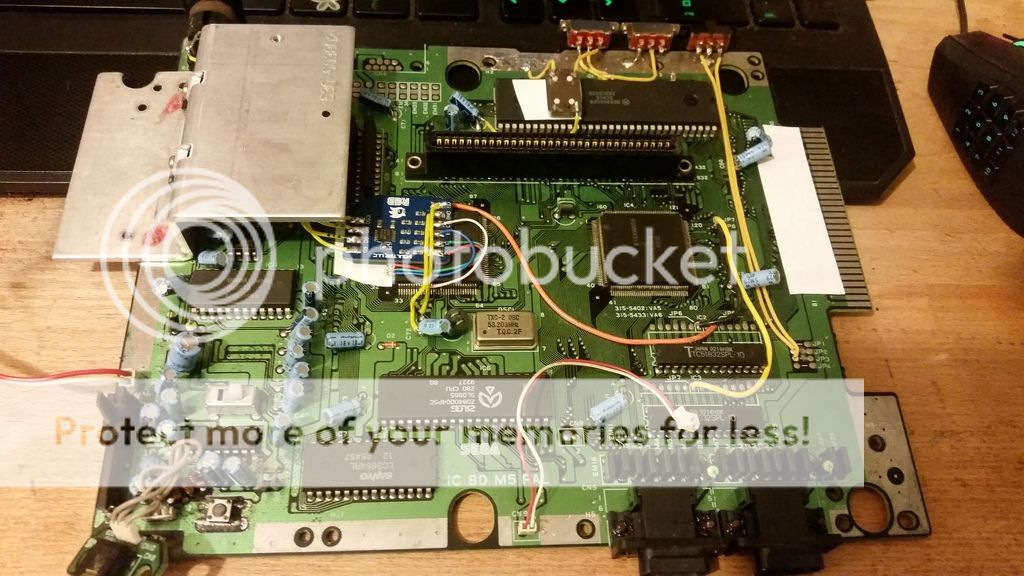
You’ll have to excuse the shoddy soldering; I’ve been messing about with this too much today.
The R, G, B, and sync are taken directly from the VDP and the pins are lifted.
Voltage and ground are taken from c72.
R, G, and B, are routed from the bypass board directly to the corresponding pins of the DIN.
The sync is taken from the bypass board directly to the composite pin of the DIN (because my SCART cable uses that for sync).
VDP pin 50 is lifted.

On the back of the board the traces for composite, sync, audio, R, G, and B, are cut near the DIN.
The DIN voltage and ground are stock.
On top of the video going black, the picture quality doesn’t seem to have improved at all.
Anyone got any suggestions?

Update (I know, it hasn’t been long).
I’ve discovered that if I manually change the source on the TV to SCART, then switch on the Mega Drive, the picture freaks out (this is not normal behaviour and didn’t happen before the mod).
But, if I leave the TV on an HDMI source and switch the Mega Drive on, and let the TV change to SCART by itself, the picture behaves normally.
I still have no idea what’s going on, or how to fix it.
Hmm…
Is the TV trying to change channel… voltage drop… or voltage fluctuation on the aspect ratio select line??
I would try taking power and ground directly from the voltage regulator, its the 7805 closest to the front of the unit.
Power and ground as they go into the bypass board.
It can be tricky to solder to these pins but I have heard Voultar recommend taking power and ground from here many times.
NewHome › Forums › Repairs and Upgrades › RGB bypass problem. Please help.
Tagged: Heeeelp!
Hi, I got a Voultar Sega RGB bypass revision 2 today and I’m having some problems.
Mega Drive 1 VA6 PAL.
I put a vid on YT so you can see what’s happening.
My problem.
The guide didn’t make much sense to me so I installed it like this:

You’ll have to excuse the shoddy soldering; I’ve been messing about with this too much today.
The R, G, B, and sync are taken directly from the VDP and the pins are lifted.
Voltage and ground are taken from c72.
R, G, and B, are routed from the bypass board directly to the corresponding pins of the DIN.
The sync is taken from the bypass board directly to the composite pin of the DIN (because my SCART cable uses that for sync).
VDP pin 50 is lifted.

On the back of the board the traces for composite, sync, audio, R, G, and B, are cut near the DIN.
The DIN voltage and ground are stock.
On top of the video going black, the picture quality doesn’t seem to have improved at all.
Anyone got any suggestions?
Update (I know, it hasn’t been long).
I’ve discovered that if I manually change the source on the TV to SCART, then switch on the Mega Drive, the picture freaks out (this is not normal behaviour and didn’t happen before the mod).
But, if I leave the TV on an HDMI source and switch the Mega Drive on, and let the TV change to SCART by itself, the picture behaves normally.
I still have no idea what’s going on, or how to fix it.
Hmm…
Is the TV trying to change channel… voltage drop… or voltage fluctuation on the aspect ratio select line??
I would try taking power and ground directly from the voltage regulator, its the 7805 closest to the front of the unit.
Power and ground for the bypass board or the DIN… or both?
Power and ground as they go into the bypass board.
It can be tricky to solder to these pins but I have heard Voultar recommend taking power and ground from here many times.
| Cookie | Duration | Description |
|---|---|---|
| _gat | 1 minute | This cookie is installed by Google Universal Analytics to restrain request rate and thus limit the collection of data on high traffic sites. |
| Cookie | Duration | Description |
|---|---|---|
| __gads | 1 year 24 days | The __gads cookie, set by Google, is stored under DoubleClick domain and tracks the number of times users see an advert, measures the success of the campaign and calculates its revenue. This cookie can only be read from the domain they are set on and will not track any data while browsing through other sites. |
| _ga | 2 years | The _ga cookie, installed by Google Analytics, calculates visitor, session and campaign data and also keeps track of site usage for the site's analytics report. The cookie stores information anonymously and assigns a randomly generated number to recognize unique visitors. |
| _gid | 1 day | Installed by Google Analytics, _gid cookie stores information on how visitors use a website, while also creating an analytics report of the website's performance. Some of the data that are collected include the number of visitors, their source, and the pages they visit anonymously. |
| Cookie | Duration | Description |
|---|---|---|
| IDE | 1 year 24 days | Google DoubleClick IDE cookies are used to store information about how the user uses the website to present them with relevant ads and according to the user profile. |
| test_cookie | 15 minutes | The test_cookie is set by doubleclick.net and is used to determine if the user's browser supports cookies. |
| Cookie | Duration | Description |
|---|---|---|
| ct_checked_emails | session | No description |
| ct_has_scrolled | session | No description |
| ct_mouse_moved | session | No description |
| ct_screen_info | session | No description |
| wordpress_apbct_antibot | session | No description |
| wp_woocommerce_session_9cc3598a6315be16da4f85bb374cf6a5 | 2 days | No description |
