
Weird artifact using OSSC.
NewHome › Forums › OSSC, OSSC Pro and DExx-vd isl › OSSC – Discussion and support › Weird artifact using OSSC.
- This topic has 3 replies, 2 voices, and was last updated July 2, 2023 at 12:02 PM by
BuckoA51.

-
AuthorPosts
-
June 27, 2023 at 7:31 AM #57315
Hi there
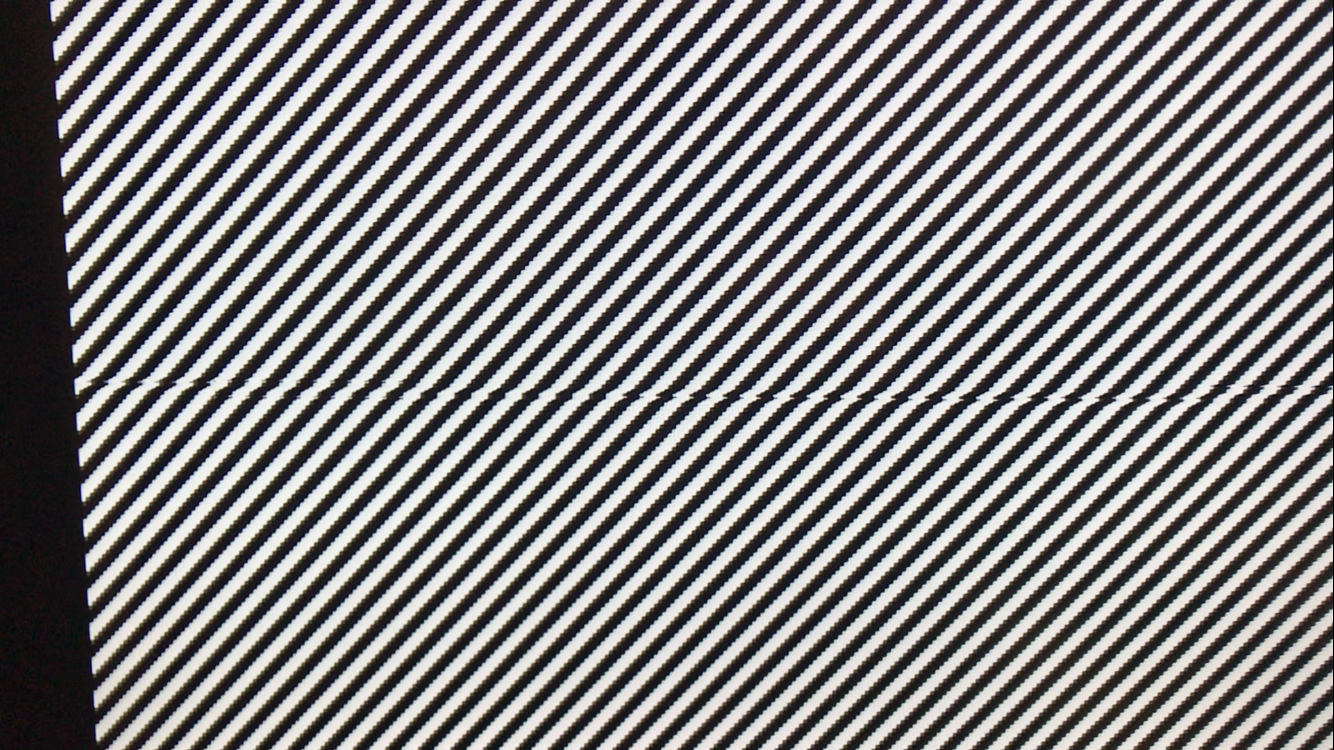
My OSSC is outputting a strange artifact which is shown in the image using a scrolling test pattern in the 240p test suite. The issue looks as if this middle section of the output is misaligned from the rest of the image and it is only noticeable when the screen is in motion or scrolling. From what I can tell so far, the issue presents on all line multiplication modes, except Line5X with the format set to either 1920×1200 or 1600×1200 (issue exists when set to 1920×1080). I don’t believe it’s an issue with my consoles or TV/cables because the picture looks normal when set to passthru and with the Line5X settings I mentioned. I’ve also tried swapping HDMI cables and using different consoles but the issue persists. I’ve also worked out that the issue only occurs when the incoming resolution from the console is either 240p or 480i. I have PAL consoles and neither 288p nor 576i have the problem. I don’t currently have the means to test any other resolutions.
Some additional information:
– The issue appeared seemingly at random. I don’t recall doing anything that I believe could have caused it.
– I am running firmware version 0.90. I was previously running 0.89 when the issue appeared but the firmware update did not resolve it.
– I’ve tested with a PAL region modded PS1 slim and a PAL GameCube both using RGB SCART. Both previously looked normal.
– I only use the stock Generic 4:3 timings, not optimal timings. However, I have tried using FirebrandX’s optimal timing profiles to no avail.If there’s any information that could be useful that I’m missing let me know and I’ll try my best to provide it. Thanks in advance to anyone that tries to help.
 June 27, 2023 at 12:15 PM #57316
It looked like your TV/monitor is struggling to deal with the signal from your PS1 console when forced to 60hz, although you say you’re seeing it on the GameCube too? I’d definitely expect to see it with the PS1, the fact you say you’re seeing it on the Gamecube gives me more pause, as that does not suffer from this issue.
Have you a different display you can test?
June 28, 2023 at 1:39 AM #57318Problem is solved now 🙂
I tested it on another display like you suggested and the picture looked fine. Turns out my TV’s Game mode was the culprit. Turning it off seems to fix the issue (which is fine since it doesn’t seem to have any meaningful impact on input lag anyway).
Thanks heaps for your help!
July 2, 2023 at 12:02 PM #57361My guess would be now that your TV is buffering more frames which would increase lag. If you can try renaming the input to “PC” and see if that makes a difference.
-
AuthorPosts


- You must be logged in to reply to this topic.
