
Struggling to get OSSC Pro to display video over component – Downscaling
NewHome › Forums › OSSC, OSSC Pro and DExx-vd isl › OSSC – Discussion and support › Struggling to get OSSC Pro to display video over component – Downscaling
Tagged: help
- This topic has 23 replies, 5 voices, and was last updated November 22, 2026 at 4:02 AM by
SubparHans69.

-
AuthorPosts
-
October 28, 2026 at 9:15 PM #71064
Hey all,
I recently got an OSSC Pro with extra AV out etc as I wanted to use something a bit nicer to output to my Sony Trinitron.
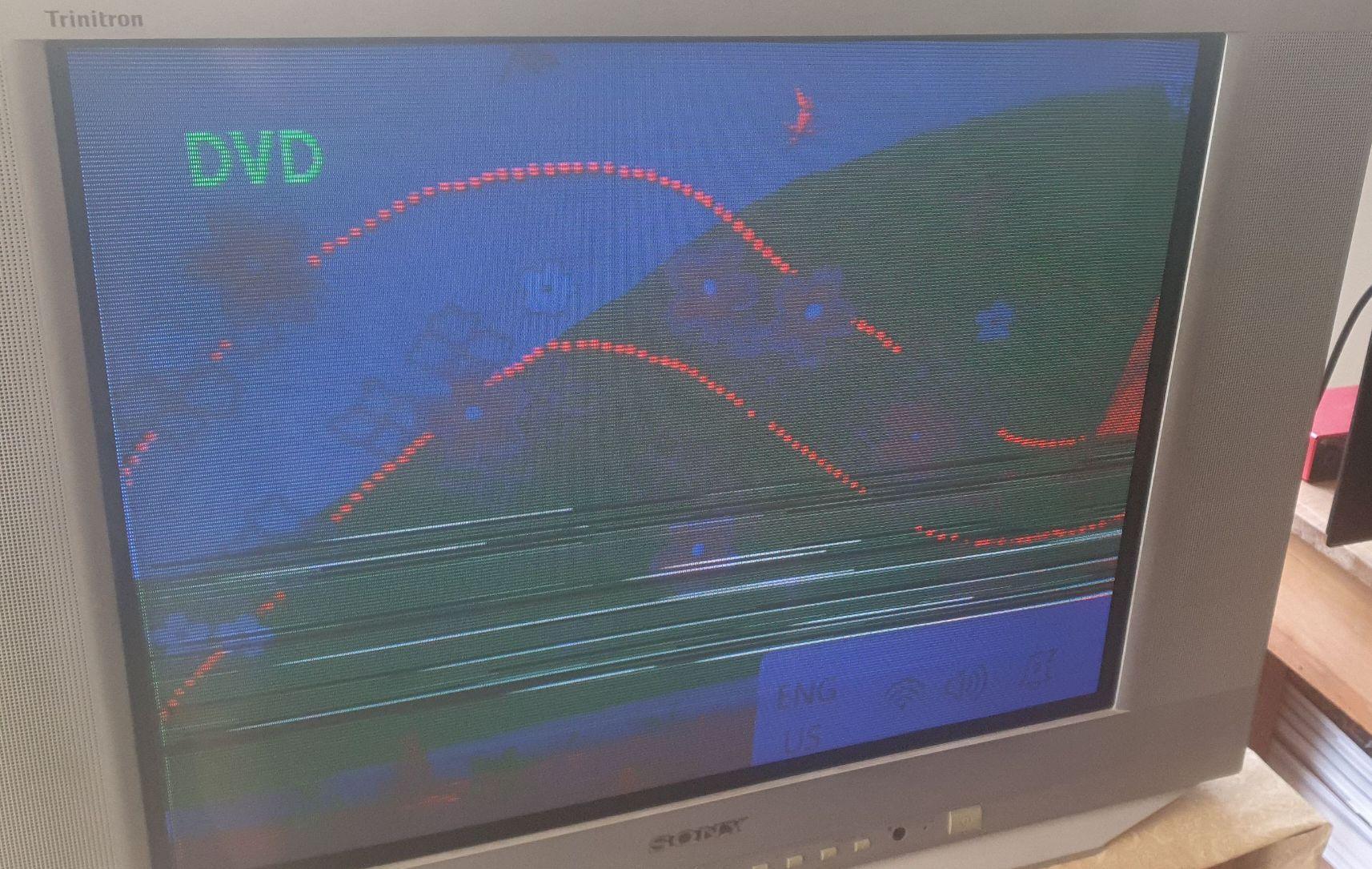
After receiving all the parts (OSSC Pro, Extra AV Out, AV Adapter 1.3), I tried setting it up and the best I can get is a garbled picture with interference. Picture is somewhat stable but has incorrect colours, dark and interference. I can’t even get a test pattern to display. I have tried troubleshooting and am unable to figure out where the issue lies.My chain is as follows : Win11 HTPC -> HDMI -> OSSC PRO (running latest FW version) -> Extra AV Out -> VGA cable -> AV Adapter 1.3 -> Component -> Sony Trinitron XJ29M31
To my knowledge the OSSC settings should be all set up correctly but also possible I may have missed something as I am not too familiar with the product yet.Let me know if you guys need further info/pictures.
Thanks in advance.
-
This topic was modified 3 weeks, 4 days ago by
October 29, 2026 at 8:21 AM #71066Try switching the option Output opt.->CSync combiner to Type B (XNOR+).
A photo or short video may indeed help figuring out the issue. 🙂
October 29, 2026 at 10:20 AM #71068Be sure to set Expansion opt->Output mode->YPbPr
Make sure you’re not outputting in a resolution or test pattern that your TV can’t support.
October 29, 2026 at 1:07 PM #71070First of all, excellent choice of components in your signal chain, in fact i have the same signal chain to send the signal from PC to my CRT!
If your CRT has scart, use the scart jack of av adapter and set “RGBS” in Expansion opt. dialogue;
If your CRT supports components, use the YUV/YPbPr jacks on the side of av adapter , use “YPbPr” in Expansion opt. dialogue, and here important: put the component cables/jacks in the right order and pull the jacks tight in the YUV-input sockets!
Make sure, that your Jumper (Switches) on your AV adapter are both on SW0, not SW1!
Sometimes, the vga-cable between extension card and av adapter is fully crap…your vga-jack should have all pins and be short… i use instead a so called “gender changer”, a vga couple with 2 vga jacks on their side (remove the screws), so 0% signal lack…
Also make sure, if your tv has a scart option, you use an excellent scart cable like from inakustik, oehlbach, (both german brands), monster, retro gaming cables or something like that!BTW: i had the same problem with my former CRT and the main issue was: that the jacks of the YPbPr/YUV-cable were not completely pull in the input sockets from the av adapter! The same is with scart possible!
October 30, 2026 at 12:14 AM #71077I managed to get the picture less garbled by outputting 640×480 to it in Windows 11, however the image is still purple and wrong. I will attach some videos/pictures to this post to show what I am working with and what the image looks like. I can confirm CSync was already XNOR+ but thank you for the suggestion. and Output mode is definitely YPbPr.
@Kekstier Thank you. I don’t have SCART unfortunately. Only Composite and component. Attached are images of the switches and component wires. I can confirm that everything is seated properly. It could be a crappy VGA or component cable. I just got some that I thought looked serviceable on Amazon. I will try replacing my VGA today and see if that makes a difference. I may also get some other component cables if needed. Because this is my first time using component I cannot say if it worked before or with another device as the only devices I own use composite.For reference these are the AMZN listings: https://www.amazon.com.au/dp/B0HF5M2R37 & https://www.amazon.com.au/Hexchuang-Computer-1920×1080-Television-Projector/dp/B0FP5KVC42
It should be worth mentioning, only 480i seems to produce any image. 576i just gives a blue screen. 240p produces same image as 480i.
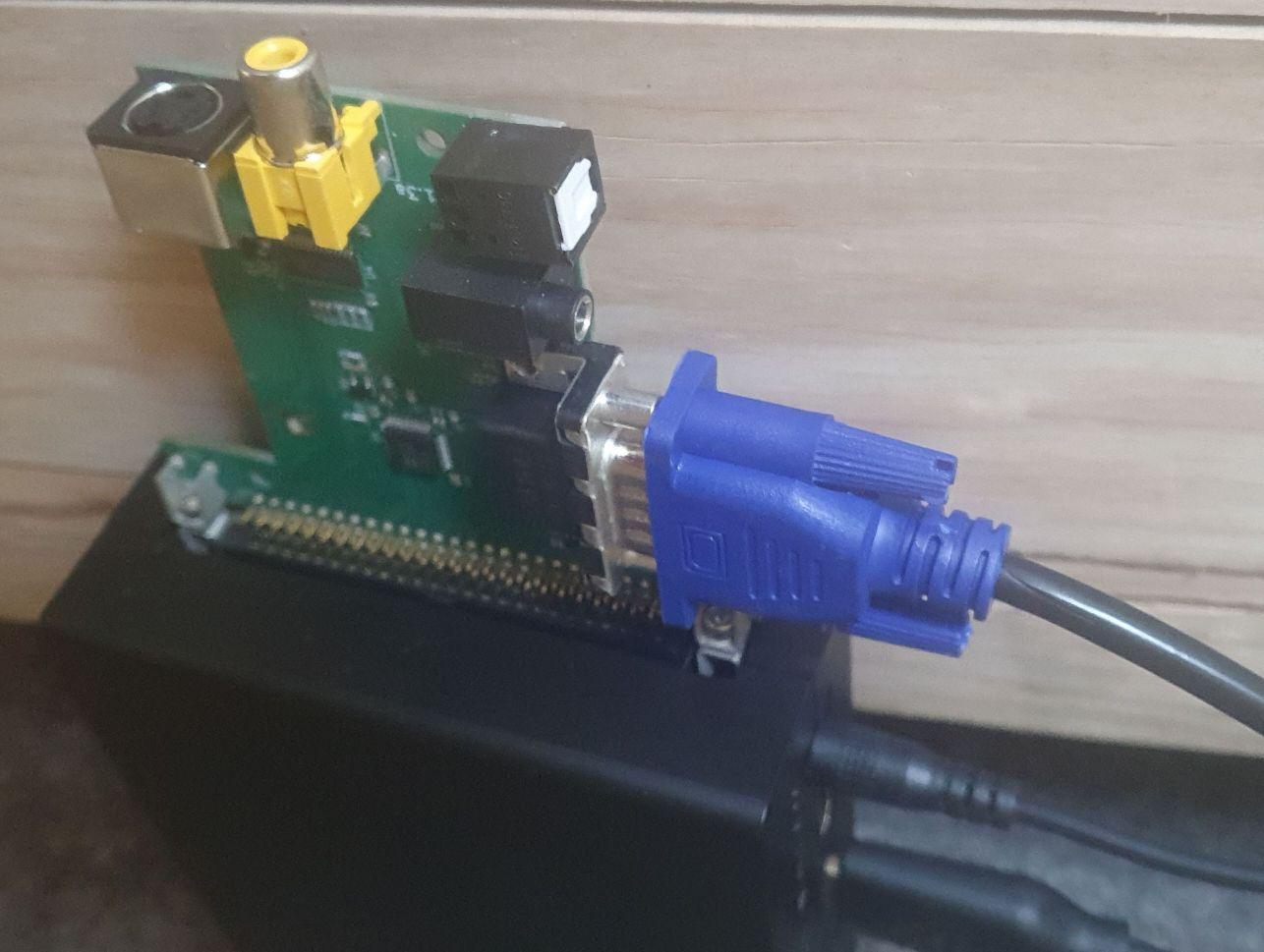
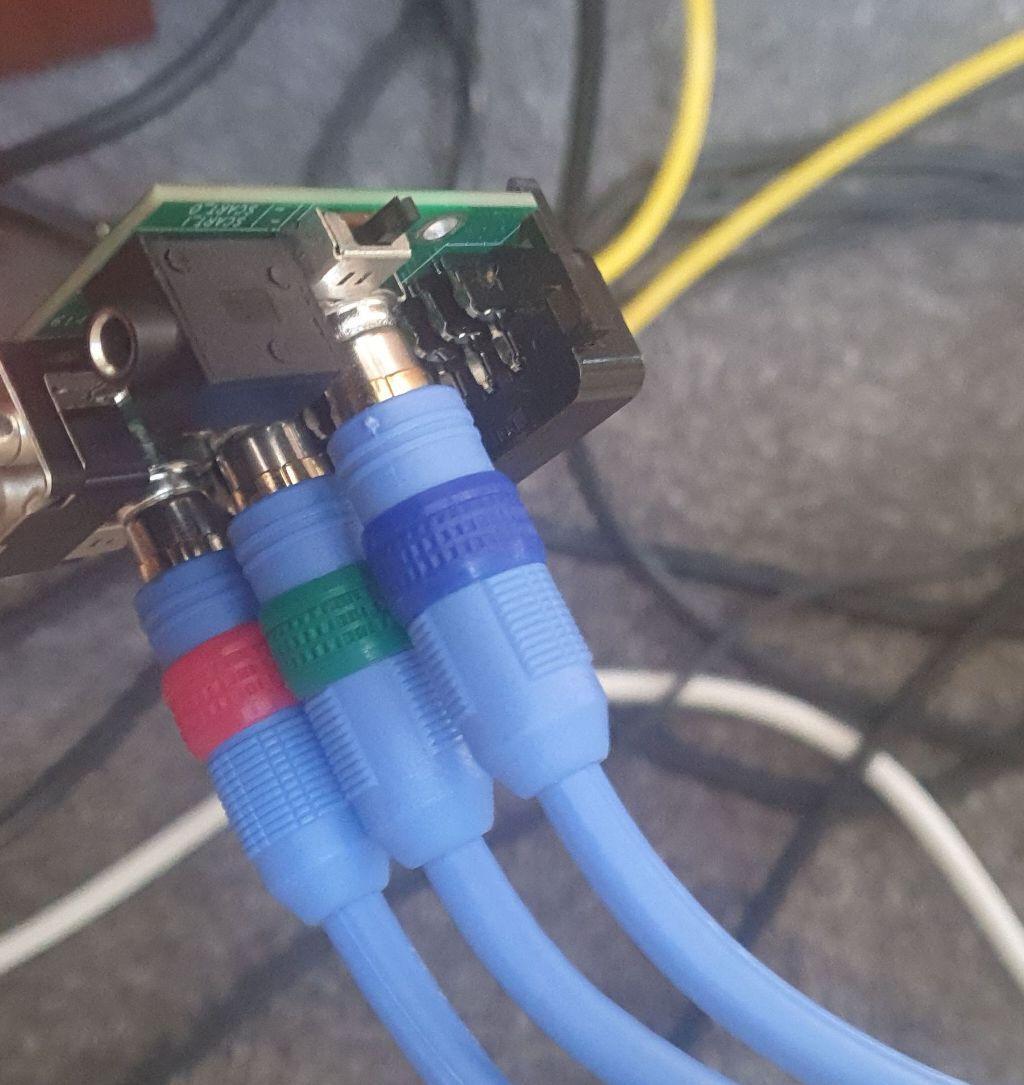
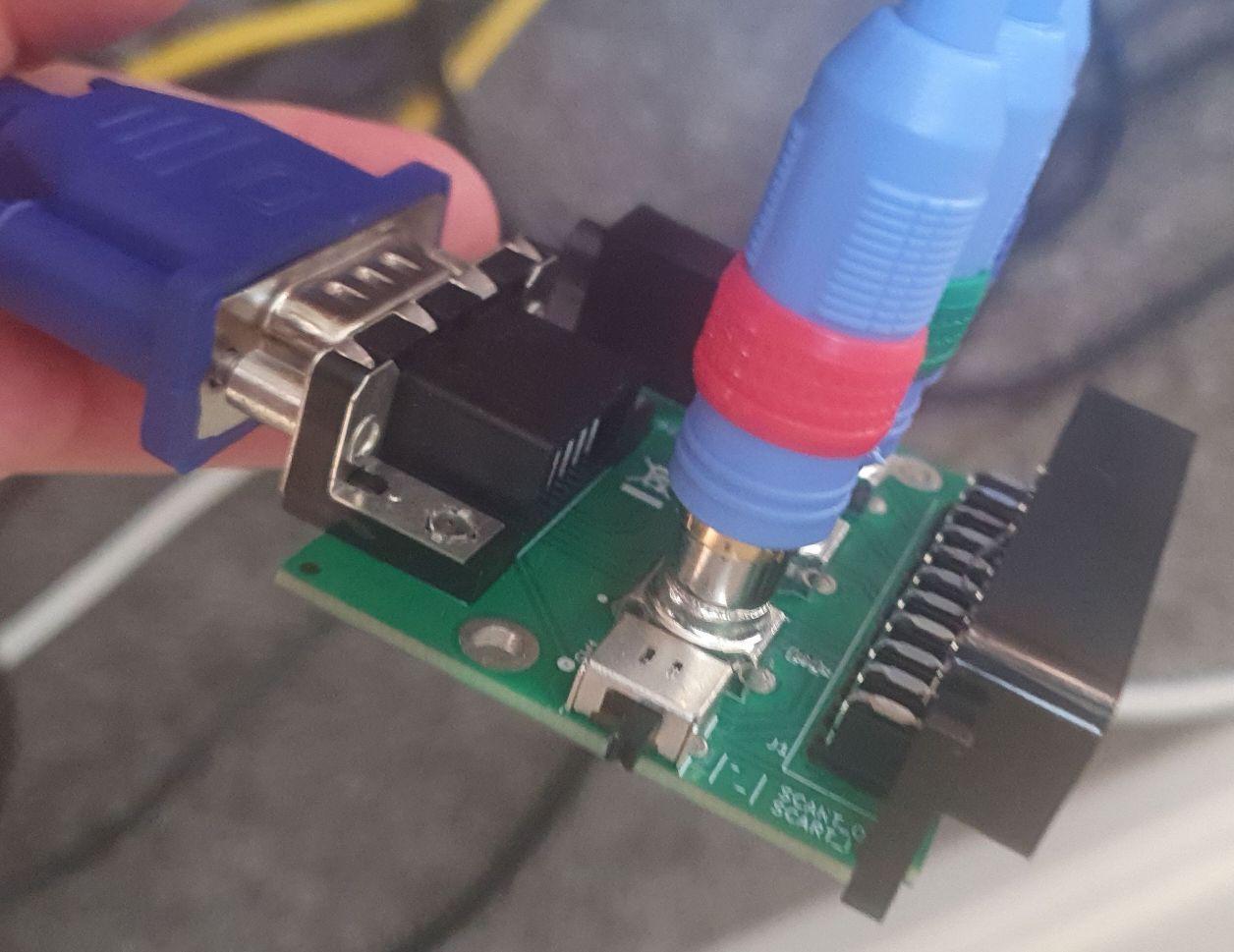
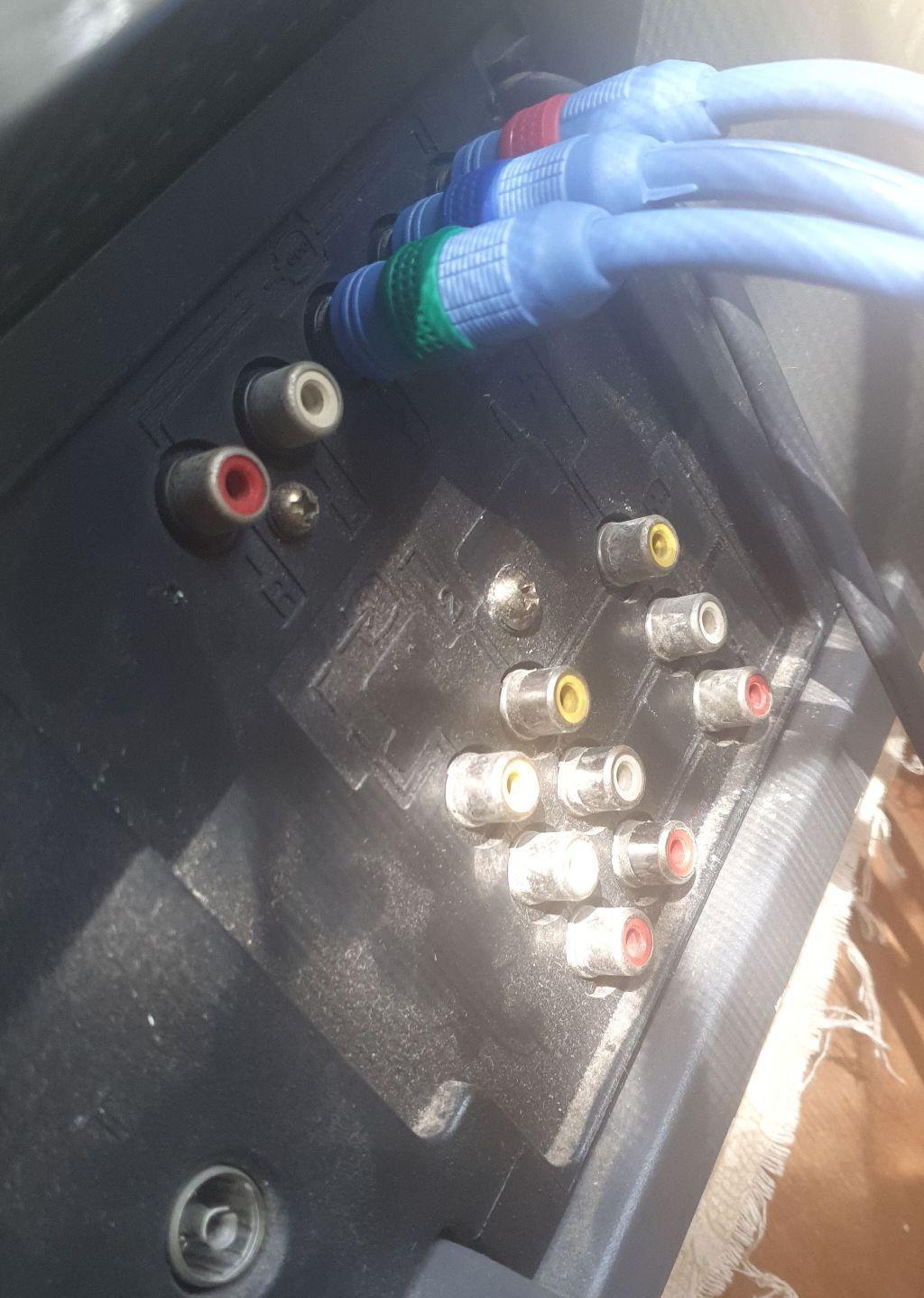
-
This reply was modified 3 weeks, 3 days ago by
October 30, 2026 at 1:39 AM #71080You have to set the switches of your av adapter to “scart_0” and “sw0”!
Use a very short HQ component cable!
The VGA-cable is full of crap… seek for brands like “LINDY”, “StarTech”, “Retro Gaming Cables” or other high quality brands for VGA- and component cables!
Better is an adapter – so i said – called: “gender changer”… a simple vga couple to jack your expansion card with your av adapter directly! (https://www.amazon.de/StarTech-GC9SM-Gender-Changer-zwei-Slimline-DB9-Steckern-Blue-Stainless-steel-Yellow/dp/B00066HJBG/ref=sr_1_2)Make sure, you use in scaler mode the option “CRT” respectively “CRT modes” like 240p and 480i… or try the LM-A-Mode…. You have to put on some TVs second times the AV-button to activate correct AV mode!
I think maybe you have problem with your HDMI interface… either the HDMI Output of your PC is damage or creepy in SD modes… probably your PC has also a VGA voutput, so you can connect to your ossc pro with VGA!
October 30, 2026 at 4:00 AM #71081I got a new VGA cable from the PC shop and image is still the same.
I may try high quality component cables next.
https://www.amazon.com.au/1-8m-BlueRigger-Component-Video-Audio/dp/B008UGDG1G/
This has good reviews, what do you think?
Also what is LMA mode?Also should I flip the switches the other way?
-
This reply was modified 3 weeks, 3 days ago by
-
This reply was modified 3 weeks, 3 days ago by
October 30, 2026 at 9:10 PM #71088I see you have the option to send the signal by s-video… maybe try s-video to ensure that the source is not the problem! If you get a picture by s-video, maybe something is wrong with the av adapter…
So when I have two ideas:
1. the switches are wrong in av-adapter,
2. the jacks of your yuv-cable are not tight enough in the sockets!LM-A-Mode or Line-Multiplier-Mode is the native mode to transform a source signal to your wished resolution! On your remote you see left of your SCL-button the LM-A button to get it! Before this, you ensure, that the LM-A mode is correct configured, go to LM-A opt. and set for your source resolution the fixed transformed resolution, for example: 720p proc. -> 480i (line-dropping)
If the source is indeed the main problem, change the input-option for your ossc pro from hdmi to vga! Supposed to be your source PC has a vga-option! So you can connect your source with ossc pro via vga to vga!
BTW: do you have set the correct input in ossc pro? For HDMI you have to push the av4 button for example to get the hdmi mode?!
October 31, 2026 at 8:06 AM #71090<p>Thank you for the reply and help. I don’t think it is S Video. It looks like something else. I have a cheap S video adapter that won’t fit. I am not sure if the Extra AV out is tight enough. I don’t really have a screw that fits it. Would you guys happen to know the name for the bit I would need to screw it in? Would LM-A-Mode make a difference do you think? My PC does have VGA but it isn’t used by the GPU. I may be able to get a HDMI to VGA adapter if that works. However I don’t know if that will make much difference as new VGA cable didn’t do a whole lot. What should I do with the switches on the AV adapter? I thought they only affect SCART. However I am happy to try any ideas you have. Yes it is set to AV4 and showing it can detect my PC just fine. It seems to recognise the 480p I am sending to it. I bought a new component cable and a composite cable. I do know composite works as I have used it before. Although I do want the sharper image, if worse comes to worse I will use composite. At least the Sonic waterfall will look correct!</p>
-
This reply was modified 3 weeks, 2 days ago by
-
This reply was modified 3 weeks, 2 days ago by
October 31, 2026 at 10:15 AM #71093The switches on the av input output adapter only affect SCART, so it won’t be anything to do with them.
If the Extra AV out is functioning then it is tight enough in the socket. The screws are really to prevent it coming undone by accident while in use (e.g if you moved a cable or something). The screw itself is called a 4 – 40 UNC hex socket.
Before worrying about scaler/line multiplier modes I would simply try to get the test patterns working. If they won’t display, then you have basically no chance at all of displaying anything else.
Power on OSSC Pro and hit the left button on the remote, that should take you to “TP 480i” which should display on all NTSC consumer televisions.
I doubt that it is your component cable either. Cheap cables will still give a correct image just are potentially more prone to interference. It’s not like SCART with all sorts of 1980s smart home tech in there that can cause issues, component doesn’t have that it’s just the signal from A to B.
October 31, 2026 at 12:23 PM #71094Search for InAkustik YUV-Kabel, I send you here a link from german shop, you find that for your state:
https://rae-akustik-shop.de/inakustik-RGB-YUV-Cinch-StarOctober 31, 2026 at 1:10 PM #71095Again I find it extremely unlikely that the component cables are to blame.
November 1, 2026 at 6:58 AM #71100<p><p>Hey Bucko. Mine is PAL region I believe but it can do both 50hz/60hz according to the TV itself. When I do 480i TP on my TV, I can faintly see the image but it is very dark and still has the horizontal interference. I am not sure if the TV itself has an issue with component as I have never used it before. I did get it serviced recently but that was for geometry issues (bad capacitors). I will check to see if it works with composite when that cable arrives. If it works, it will mean the issue will lie within the AV adapter 1.3 or the TV’s component circuitry. I am sort of running out of ideas as to where the issue is. Also as an update I asked the technician if he checked component and noticed any issues with it so I will see what he says. If he says the component input has issues then that is that. But it will help narrow down what the problem is.</p>
-
This reply was modified 3 weeks, 1 day ago by
November 1, 2026 at 9:44 AM #71102Going by the photo, it looks as if the TV fails to clamp the luma signal fully back to its intended level. I’m not sure if that’s the cause of the random lines too.
While you’re waiting for the composite cable, you can try connecting the green (i.e. luma) connector on the component cable to one of the composite inputs.
Check if you get a stable black-and-white picture then with the OSSC Pro set to output 480i, including the test pattern. That could help rule out a fault with the OSSC Pro or its expansions.
There could be a fault in the component cable, so if the problem remains another thing you can try is swapping the green connector for the red or blue one on both ends and see if it changes how the fault appears.
November 1, 2026 at 9:46 PM #71103Technician said they didn’t check anything to do with component. Thank you for the advice. Do I need to change any settings to tell it to output to composite?
-
This topic was modified 3 weeks, 4 days ago by
-
AuthorPosts


- You must be logged in to reply to this topic.
