
dawizeguy

@dawizeguy
Forum Replies Created
-
AuthorPosts
-
Sorry for the belated answer:
It’s tough to give advice regarding the PS2. PS2 games use different internal resolutions and it’s a pain trying to achieve correct aspect ratio. I have spent a lot of time fighting squished aspect ratio, especially 480i games. There’s no easy fix. Sometimes it works adjusting H.active to 704, 686 or 640. Sometimes even as low as 512. Aspect ratio is unfortunately one of the few areas where the OSSC is hard to work with and one I hope will see an improvement in the new hardware revision.
480p doubled to 960p on my LG OLED works fine, but I prefer 480p since it has less black bars.
Final update:
My old scart was the culprit. I just received a new RGB scart cable from Retrogamingcables and everything is now fine in progressive scan. No more ghosting.
Update 2:
I managed to establish that the OSSC is NOT responsible for this phenomenon. It looks exactly the same when using a component to HDMI transcoder.
Bottom line:
This horizontal blur is either caused by the Xbox component output or the LG OLED television’s handling of this output.The issue I’m facing with 480p through SCART looks like the issue the Framemeister has with 480p and the PS2:
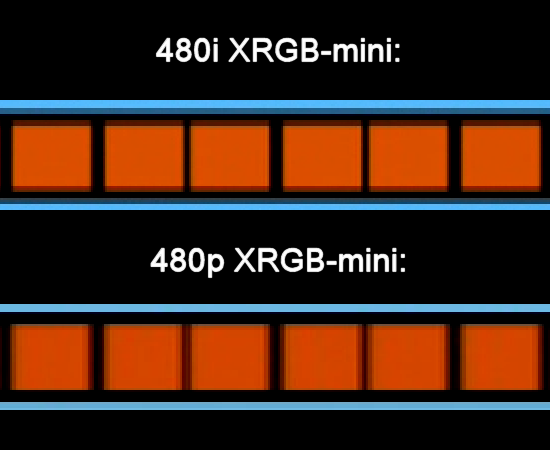
Don’t know if it’s the cable or the OSSC.
Update:
I see this checkerboard pattern too in the Splinter Cell menu. I managed to get rid of the vertical lines by increasing sampling phase to 303 (from 180). It’s in the sampling menu. With 303 I only see the thin horizontal lines which is how it’s supposed to look IIRC.
TBH I don’t see any difference between 180 and 303 in-game, but that’s probably just my old eyes 🙂
Let me know if this works for you.
I have a similar tv (LG B7) and believe I’m experiencing similar issues with my PS2 in 480p mode (SoG, RGB SCART). It looks like some sort of edge enhancement or haloing effect, but slightly blurred. It’s like there’re two layers, a full colored layer and a transparent which are not completely alligned. It’s not as visible with component cables, probably because component is less sharp.
I haven’t done any testing with my Xbox, but will try a few games tonight and report back my findings.
Regarding the component issue, I agree that faulty component cables would invalidate any argument that RGB is better. It’s been a couple of weeks since I last checked and it seems he pulled the links to test results.
That said, I’ve just spent 3-4 hours testing my PS2 set up comparing the following two set ups:
Set up 1: RGB SCART cable (from Gamestop), RGBS for interlaced sources and RGsB for progressive scan sources
Set up 2: Official Sony PS2/3 component cable, YPbPr for both interlaced and progressive sourcesBoth set ups were hooked up to my OSSC which was then connected directly to my television.
Testing back and forth with 4-5 games I’ve come to the conclusion that RGB SCART looks marginally better than component in both interlaced and progressive scan mode. Colors look slightly better and RGB is sharper than component. For instance, in Splinter Cell dithering artifacts are a bit more noticeable with RGB SCART than component, a clear proof of extra sharpness.
Regarding video “noise” with the Sony component cables, I haven’t seen any to be honest. It looks completely fine to me. But RGB looks marginally better to my eyes.
The only issue with RGB SCART is this ghosting / edge enhancement / sharpness thing happening in progressive scan mode. I don’t know if it’s caused by the cable, the OSSC, the 480p to 4K upscaling on my television or a combination of these factors. In any case I’ll just live with it for now and invest in a new shielded RGB SCART cable from Retro Gaming Cables when they are in stock.
According RetroRGB the difference between RGB and component is well-established and has nothing to do with bad component cables although this will exacerbate the issues. But is it noticeable? For the post part, probably not.
Regarding my convenience argument:
A component cable has separate video and audio leads and you need an RCA to mini-jack converter to connect the two audio leads to the OSSC. RGB on the other hand carries both video and audio in the same lead. Plus I’d like to use the OSSC’s component inputs for my Xbox and Wii.The PS2 internally renders in RGB and converts to the YUV color space when using component cables. Apparantly only the launch model (fat) PS2 is able to convert RGB to YUV without some degradation in image quality. Later models, especially the slim SKU’s, have noticeable more noise with component cables compared to RGB cables. I have seen pictures of this in another forums plus mentions elsehwere. This is why I’d prefer using RGB connection. RGB is also more convenient to use since both video and lead goes through the same connector whereas I have to fiddle with separate audio and video cables for component.
That said, I haven’t been able to establish any difference in my set up since my RGB has some some problems with 480p and higher resolutions. Since I haven’t heard of anyone else having these problems I assume I need to buy a higher quality RGB cable.
-
AuthorPosts

